
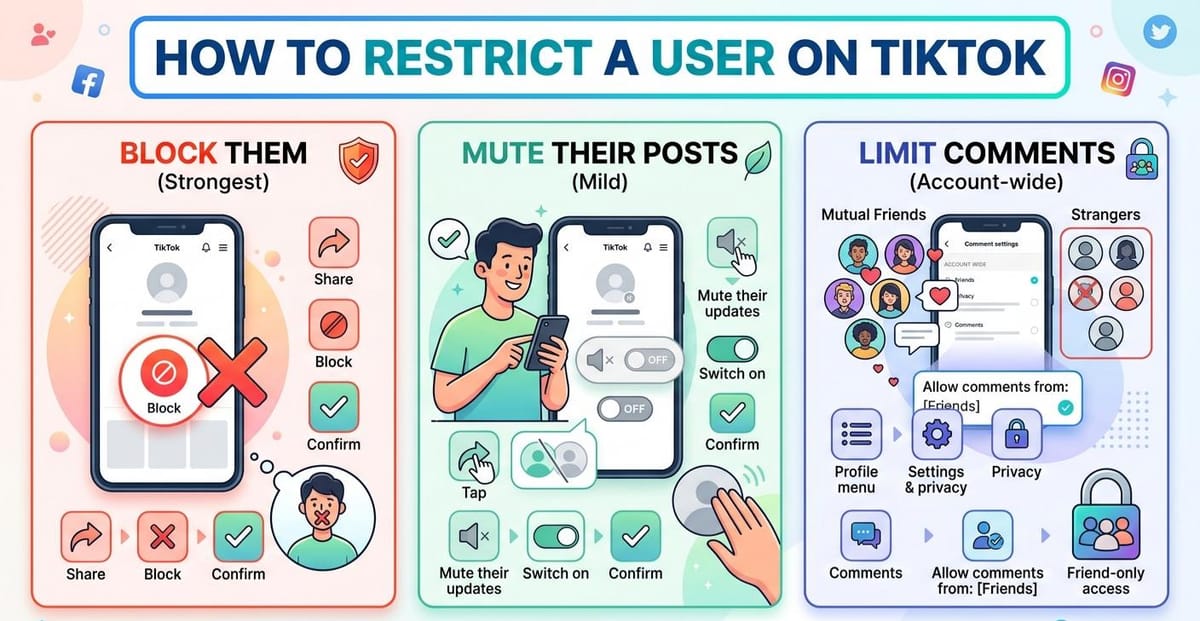
TikTok ships no button labelled Restrict. Instagram and Facebook both have one, so the gap catches people out. Three other controls still do the job. A block cuts every link with that account. Muting hides their clips from your feed. One comment setting shuts out everyone outside your mutual follows.
Three Ways to Restrict a User on TikTok
Each method sits at a different strength. Read the table, then jump to the steps that match.
| Method | Strength | What it stops |
|---|---|---|
| Block | Strongest | Their view of your profile, direct messages, and comments on your videos |
| Mute their posts | Mild | Their clips appearing in your feed |
| Limit comments | Account-wide | Comments from anyone outside your mutual follows |
Block Them: The Strongest Way to Restrict a User on TikTok
A block closes every door at once. That account cannot open your profile, cannot message you, and cannot watch or comment on anything you upload.
TikTok sends no alert. The person finds out only if they notice your page stops loading.
| Step | What you do |
|---|---|
| 1 | Open the profile of the account you want to block |
| 2 | Tap the share icon at the top right, drawn as a bent arrow |
| 3 | Select Block at the bottom of the panel |
| 4 | Tap Block again to confirm |
Four taps and the account is gone. Anyone tightening things further should also read the steps for making your TikTok account private, since a block alone leaves public videos visible to logged-out browsers.
Blocking one account fixes one problem. It does nothing about the details a public profile already gives away, which our privacy playbook for creators covers in full.
Mute Their Posts Instead of Blocking
A full block sometimes costs more than it saves. Cutting off a coworker or a cousin tends to start an argument.
Muting avoids that. Their uploads stop reaching your feed while the follow stays intact.
| Step | What you do |
|---|---|
| 1 | Open the profile of the account you want to mute |
| 2 | Tap the same share icon at the top right |
| 3 | Choose Mute their updates from the list |
| 4 | Switch on Mute their posts, then confirm |
They keep posting. You stop seeing any of it while you scroll. If the issue is your own footage being reused rather than their clips reaching you, the fix is removing a Duet or Stitch instead.
Restrict a User on TikTok by Limiting Who Can Comment
The first two methods deal with one account. This one covers everybody.
Change a single setting and only accounts you follow back can write under your videos.
| Step | What you do |
|---|---|
| 1 | Open your profile and tap the three-bar icon at the top right |
| 2 | Choose Settings and privacy, then Privacy |
| 3 | Scroll to Comments, tap it, then open Allow comments from |
| 4 | Select Friends, meaning followers you also follow |
Nobody outside that circle can comment afterwards. For control over specific wording rather than specific people, the guide on TikTok comment filters goes deeper.
Keyword blocking works alongside it. Adding terms through muted words in TikTok comments catches repeat phrases before they appear, and pinning a comment pushes the tone you want to the top.
Does TikTok Have a Restrict Feature Like Instagram?
No. Instagram’s Restrict hides a person’s comments from everyone except themselves. TikTok has never shipped an equivalent.
The closest match is the Friends-only comment setting, though it applies to your whole account rather than one person. Where an account breaks the rules outright, reporting the video matters more than any privacy toggle, because moderation acts on the account itself.
Choosing the Right Way to Restrict a User on TikTok
| Your situation | Best option |
|---|---|
| Someone targets you directly | Block |
| You want quiet without ending the follow | Mute their posts |
| Strangers keep leaving junk comments | Limit comments to Friends |
Start mild if you are unsure. Muting is the softest of the three and reverses in seconds.
Move up to a block when the same account keeps returning. Live streams need their own approach, covered in our walkthrough on moderating a TikTok LIVE.
All three settings take under a minute to change. Keep them in mind and pick whichever fits the moment.
FAQs
Does TikTok have a restrict feature like Instagram?
No. TikTok has no Restrict button. Blocking, muting a person’s posts, and limiting comments to mutual follows cover similar ground through three separate settings.
Does someone know when you block them on TikTok?
No notification goes out. The person may notice your profile stops loading or that their comments disappeared, but TikTok never tells them directly.
Can you tell if someone muted you on TikTok, as Reddit users often ask?
No. Muting leaves no trace at all. The follow stays active, posting continues as normal, and no alert is sent. The question comes up constantly in Reddit’s TikTok communities.
What do Reddit users recommend for TikTok harassment?
Reddit threads on TikTok safety tend to favour blocking and reporting together. A block alone leaves the account free to target other people. Screenshot anything abusive first.
Can a blocked person still see your TikTok videos?
Not while signed in to that account. A public profile stays visible to logged-out browsers or a fresh account, so switch to private if that gap matters.