How to Make Your TikTok Account Private

Maxime Dupré
8/12/2026
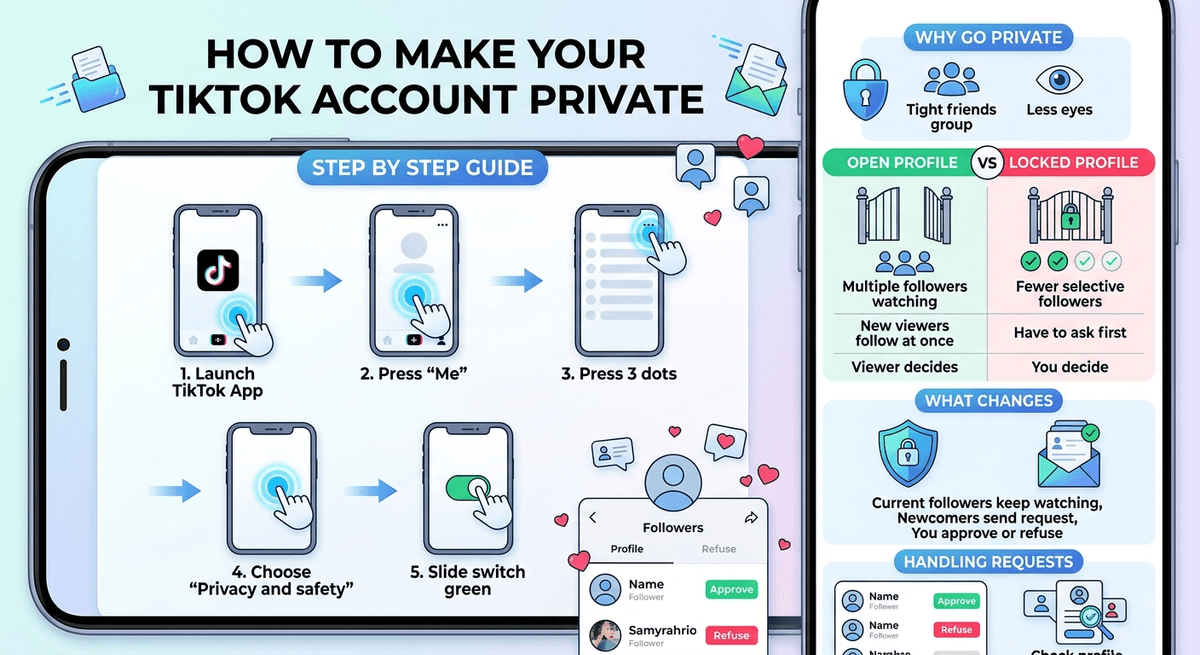
Every fresh TikTok profile starts out open to everyone. Any person can follow you, and any person can watch the clips you upload. If you would rather keep unknown viewers away from your videos, the app lets you lock the profile down whenever you feel like it. The switch takes less than a minute, and you can flip it back later.
Why People Choose to Make Their TikTok Account Private
Some users post only for friends. Others simply want fewer eyes on their uploads. A locked profile solves both worries without deleting anything. Your videos stay where they are. They just stop being visible to random visitors.
What Changes Once You Make Your TikTok Account Private
Nothing bad happens to the followers you already have. Every one of them keeps following you, and they can still watch your posts as before. The difference shows up with newcomers. Someone who wants to see your uploads must send you a request first. That request sits and waits for you. You then say yes or say no. The choice is yours each time.
| Point of comparison | Open profile | Locked profile |
|---|---|---|
| Current followers | Keep watching | Keep watching |
| New viewers | Start following at once | Have to ask first |
| Who decides | The viewer | You |
| Can it be reversed | Yes | Yes |
How to Make Your TikTok Account Private Step by Step
Grab your phone and follow these five taps in order.
Launch the TikTok app on your iPhone or your Android handset.
Press “Me” in the lower right corner of the display.
Press the three dots sitting in the upper right corner.
Choose “Privacy and safety.” You will spot it second from the top of that menu.
Slide the switch beside “Private account” toward the right. Once that switch turns green, the job is done.
The green colour is your confirmation. There is no save button to press and no extra screen to sit through. Close the settings page and carry on.
If you like tidying up your profile while you are in there, our guide on changing your username on TikTok walks through another quick edit in the same corner of the app.
Handling Requests After You Make Your TikTok Account Private
Requests pile up in your inbox rather than turning into followers straight away. Read the name, glance at the profile, then approve or refuse. Refusing costs nothing and sends no alert to the other person. You can also change your mind later and remove a follower you accepted earlier.
Curious about who has been watching all along? Take a look at our explainer on turning on profile view history.