How to Remove a Duet or Stitch on TikTok

Maxime Dupré
9/8/2026
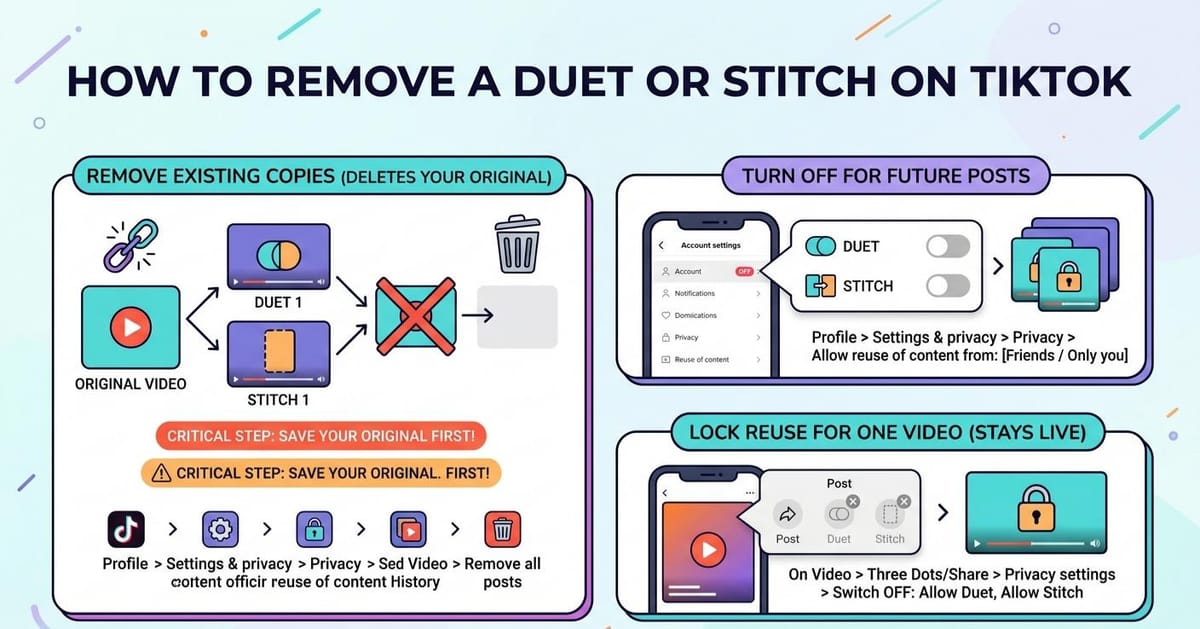
Someone built a clip on top of your video and you want it gone. Or you would rather nobody borrowed your uploads again. Both run through the same menu. Here is how to remove a Duet or Stitch on TikTok after it is live, how to switch reuse off for everything you post next, and how to lock a single clip.
What Happens When You Remove a Duet or Stitch on TikTok
TikTok ties every copy back to your first upload. The app treats them as one chain, not separate posts.
That means clearing the copies pulls your original down with them. There is no option to keep the source video and delete only the responses.
Three routes exist, and they do different things:
- Reuse of content history clears copies that already exist, along with your first upload
- Reuse of content sets who may borrow everything you post from now on
- A single post’s Privacy settings switches reuse off for that clip while it stays live
How to Remove a Duet or Stitch on TikTok After It Is Posted
Save a copy of your video to your phone first. Once the chain comes down, it comes down for good.
- Open TikTok and tap Profile on the bottom bar
- Press the three-line icon in the top right, then pick Settings and privacy
- Choose Privacy, then open Reuse of content
- Tap Reuse of content history
- Pick the clip you want to handle, then press the three dots at the top
- Hit Remove all posts and confirm with Remove
Older app versions label this section Stitch, with a Manage associated videos option inside. The steps behave the same way.
New to the two features? Our walkthrough on making a Duet explains what each one does before you start switching them off.
How to Turn Off Duet and Stitch on TikTok for Future Posts
Removing copies one at a time gets tiring. One switch closes the door on everything you upload later.
- Head to Profile and press the three-line icon at the top right
- Pick Settings and privacy, then open Privacy
- Scroll to Reuse of content and tap it
- Under Allow reuse of content from, pick Friends or Only you
Friends still lets people you follow back join in. Only you, shown as No one on some versions, shuts it completely.
Creators who want tighter control across the board often pair this with a private TikTok account. Our privacy playbook for creators covers what else a public profile gives away.
How to Remove a Duet or Stitch on TikTok for Just One Video
A blanket rule is sometimes too much. Say one clip keeps getting reused in ways you dislike, but the rest are fine.
You can keep that post online and close reuse on it alone.
- Visit your profile and tap the clip you have in mind
- Press the three dots or the share icon on the side panel
- Slide across the row of choices and tap Privacy settings
- Switch off Allow Duet and Allow Stitch
The post keeps its views, likes and comments. Only the borrowing stops.
Things to Check Before You Remove Duets and Stitches
Deleting your first upload is the price of clearing old copies. Download a version to your phone before you tap Remove.
Changing the account-wide rule does not touch clips you posted earlier. Those keep whatever permission they carried on the day you shared them.
Go back through older clips by hand if you want them locked as well. If a copy crosses a rule rather than just annoying you, reporting the video is the better route, since removal alone does not flag anything to moderators.
Reuse is not the only thing worth tightening. Many creators also filter comments or mute specific words at the same time.
Where TikTok Explains the Duet and Stitch Rules
TikTok Support publishes its own pages on managing duet histories and stitch deletion. Check those if the menu names on your version differ from the ones listed here.Menu wording changes between app builds and regions. Worth checking your own TikTok analytics afterwards too, since pulling a chain removes the views that sat on the original.
FAQs
Can you delete a Duet someone made of your video?
Yes. Open Settings and privacy, then Privacy, then Reuse of content history. Select the clip, tap the three dots and choose Remove all posts. Your original video is deleted at the same time.
Does removing a Duet delete your original TikTok?
Yes. TikTok links every copy to the source upload, so removing the copies takes the original down too. Download the video to your phone before confirming if you want to keep it.
How do you stop people from Stitching your TikToks?
Go to Settings and privacy, then Privacy, then Reuse of content. Under Allow reuse of content from, select Friends or Only you. The rule applies to posts you upload after the change.
Can you turn off Duet on just one TikTok video?
Yes. Open the post, tap the three dots or share icon, choose Privacy settings, then switch off Allow Duet and Allow Stitch. The video stays live with its views and comments intact.
Why is the Duet button greyed out on TikTok?
The creator restricted reuse, the account is private, or the account holder is under 16. Region rules and copyright claims on the audio can also disable Duet and Stitch on a post.