How to Mute a Word on TikTok Comments

Maxime Dupré
8/13/2026
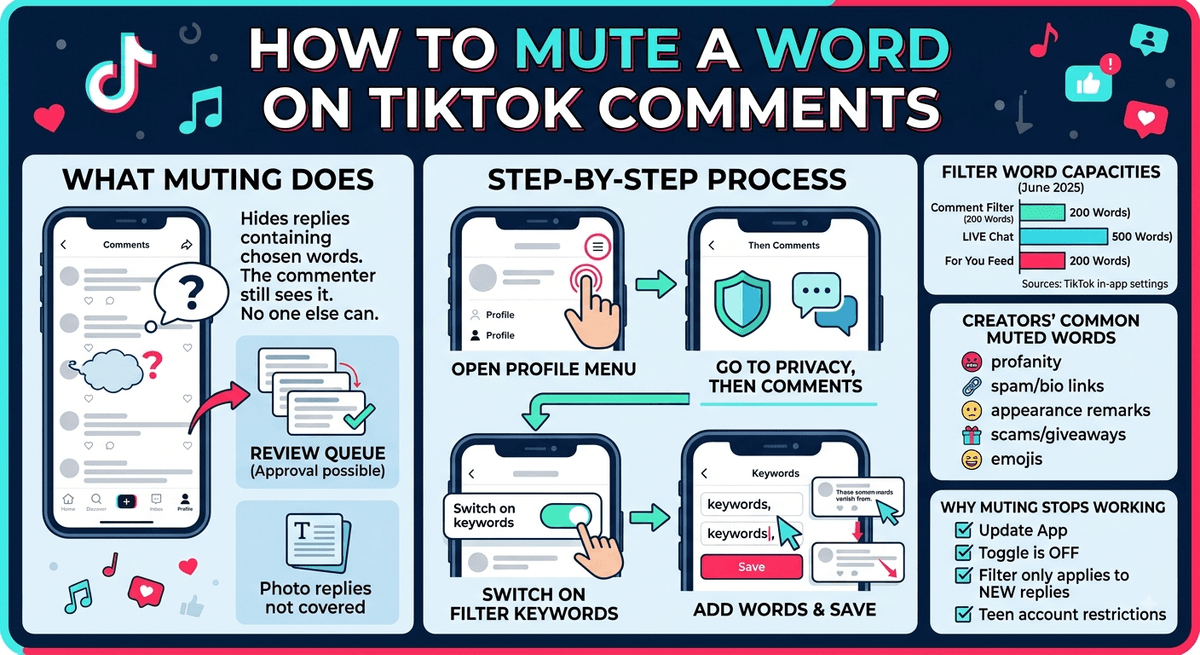
A single rude reply can sour an otherwise decent day. TikTok lets you stop those words before they land on your screen. The comment keyword filter hides any reply holding a term you picked, and it keeps running once saved. Here is how to mute a word on TikTok comments, what the filter catches, and what to try when it stops working.
What Muting a Word on TikTok Comments Actually Does
Adding a term to your filter list tells TikTok to hide replies containing it. The person who typed the comment still sees it on their own screen, so no notification goes out and no argument starts over a missing reply.
Everyone else sees nothing. Filtered comments land in a review queue you can open later, which means you can approve anything the filter caught by mistake.
Text is all the filter reads. Photo replies posted under a comment count as separate posts and sit outside the keyword list.
How to Mute a Word on TikTok Comments
The setting lives in your account privacy menu. The path is identical on iPhone and Android.
Open Your Profile Menu
Launch TikTok and tap Profile at the bottom right. Tap the three-line icon near the top, then choose Settings and privacy.
Go to Privacy, Then Comments
Tap Privacy and scroll to Comments. This screen holds every comment control TikTok offers, including who can reply to you at all.
Switch On Filter Keywords
Find Filter keywords and turn the toggle on. Some app versions label it Muted keywords. Same tool, different wording.
Add Your Words and Save
Type each word or phrase, separating entries with a comma or a new line. Tap Save.
Replies holding those terms drop out of public view from that point on. The filter is not retroactive, so older comments stay put and you may need to pull the video down or clear them by hand.
How Many Words You Can Mute on TikTok
| Filter | Keyword Limit |
|---|---|
| Comment keyword filter | 200 keywords |
| LIVE chat blocked keywords | 500 keywords |
| For You feed keyword filters | 200 keywords |
Sources: TikTok in-app settings, TechCrunch (June 2025)
TikTok doubled the feed keyword cap from 100 to 200 in June 2025 and added synonym matching there, so one entry catches close variants.
Comment filters read exact matches only. Misspellings slip past, which is why creators add spaced-out and number-swapped versions of the same term.
Which Words Creators Usually Mute in TikTok Comments
- profanity and slurs
- sales spam like check my bio or dm for collab
- competitor names and brand mentions
- remarks about appearance or body
- scam bait such as free money, cash app, giveaway
- specific emojis, pasted straight into the field
Nobody audits your list. If a word bothers you, mute it.
Tips That Keep Your Muted Keyword List Working
Add several terms in one sitting instead of one at a time. A list only helps when it covers what actually turns up.
Revisit it every few weeks. Spam wording shifts fast, and a filter built last year misses this year’s junk.
Leave TikTok’s automatic spam and offensive comment toggle switched on next to your list. The two run together.
Open the review queue now and then. Filters catch real questions from real viewers, and that costs you engagement while you are building a following.
Other TikTok Comment Controls Worth Knowing
- Comment approval holds every reply until you clear it. Strict, but handy during a product launch.
- Who can comment can be set to everyone, followers you follow back, or nobody, per video or across the account.
- Blocking removes a repeat offender for good. Shutting an account out sends no alert, though there are telltale signs on their end.
- Broadcasts carry their own keyword list plus moderators who can mute viewers mid-stream.
- Comments on paid posts are handled separately inside Ads Manager.
Why You Cannot Mute a Word on TikTok Comments
| What went wrong | What to do |
|---|---|
| Outdated app version | Update TikTok through the App Store or Play Store |
| Filter keywords toggle is off | Switch it back on before adding terms |
| The word never saved | Re-enter it and tap Save before leaving the screen |
| Comment was posted earlier | Delete it by hand; filters only affect new replies |
| Account is under 16 | Several comment settings stay locked on teen accounts |
| You cannot sign in to reach settings | Follow the account recovery steps first |
Most cases clear once the app updates, so start there before trying anything else.
FAQs
Does TikTok tell someone their comment was filtered?
No. The commenter still sees their own reply on their screen. No notification goes out, and the comment stays hidden from everyone else unless you approve it later.
Can I mute words in TikTok comments on desktop?
Comment keyword filters are set in the mobile app. The desktop site does not show the Filter keywords toggle, so build your list on a phone or tablet.
How many keywords can I add to TikTok comment filters?
Around 200 for comments. TikTok LIVE runs a separate list holding up to 500 blocked keywords for chat during a broadcast.
Do muted keywords hide old comments?
No. Filtering applies to comments posted after you save the list. Replies already published stay visible until you delete them yourself.
Can I see the comments my filter hid?
Yes. Open the review queue under Comments in your privacy settings. You can approve, ignore, or delete anything the filter pulled down.