
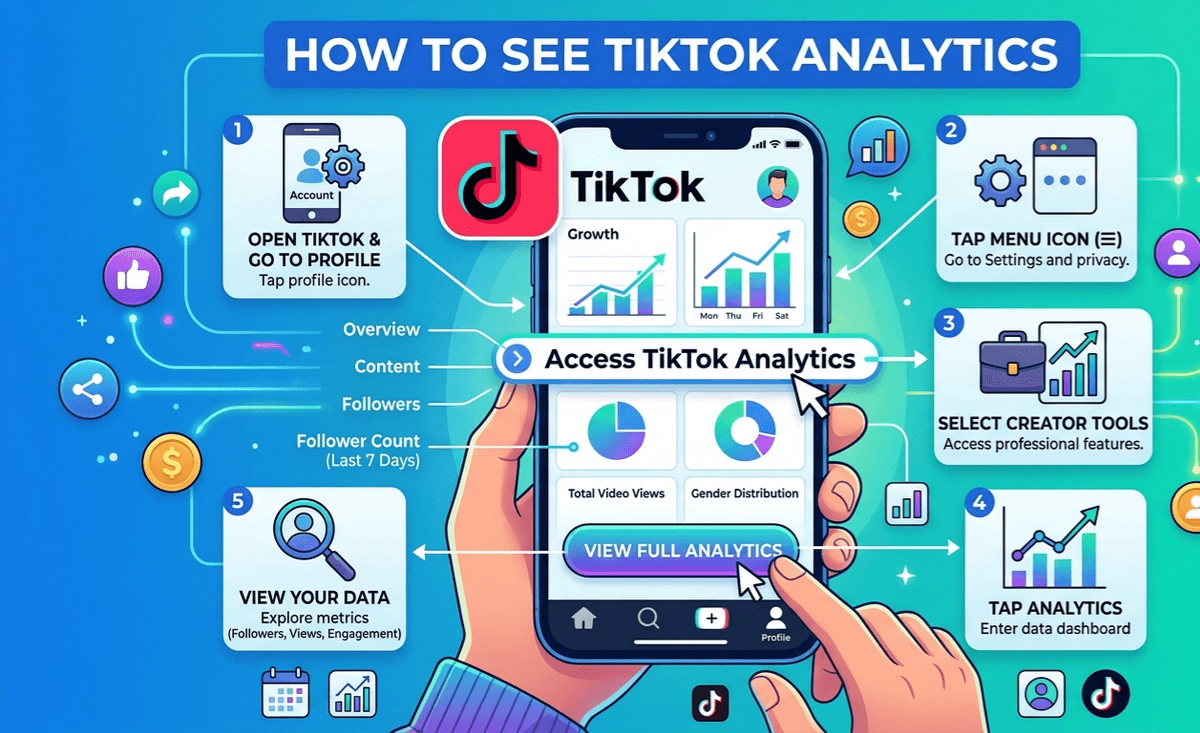
TikTok analytics tell you who watches your videos, where the views come from, and which posts pull in new followers. You need a Creator or Business account to reach this data. On a personal account, switch first inside your profile settings, and the numbers show up right after.
Where to see TikTok analytics on mobile
The app is the quickest route to your data.
- Open TikTok and tap the Profile icon at the bottom right.
- Tap the menu lines at the top right.
- Open Creator tools, or TikTok Studio if your app runs the newer layout.
- Tap Analytics.
The dashboard lands on an overview of the last 7, 28, or 60 days. Set a custom date range when you want to line up two specific periods.
How to see TikTok analytics on desktop
Desktop gives you a wider view, which helps when you read longer stretches of data.
- Go to tiktok.com and log in.
- Click your profile picture at the top right.
- Select View Analytics.
You get the same numbers as the app. The bigger screen just makes it easier to compare tabs side by side and export a report.
What the TikTok analytics dashboard shows
TikTok splits the data into a few tabs. Each one answers a different question.
| Tab | What it measures |
|---|---|
| Overview | Total views, followers, profile visits, and likes for the period you pick |
| Content | Per-video performance, including views, reach, and watch time |
| Followers | Audience demographics, active hours, and follower growth |
| LIVE | Session data such as total viewers and diamonds earned |
Most creators start on Overview. One glance tells you the direction of the account: growing, flat, or slipping.
Reading your content analytics per video
Tap any video on the Content tab to open its own breakdown. Each post reports:
- Total play time across every view
- Average watch time, in seconds
- Reached audience, meaning the unique accounts that saw it
- Traffic sources: For You page, your profile, search, or the following feed
- Audience territories for that specific post
Compare average watch time against the length of the clip. That ratio tells you how engaging the video really was. People dropping in the first two seconds means the hook needs work. Viewers who stay to the end, or rewatch, are the signal you want. If you want to see what holds attention, it helps to study what the top gaming creators on TikTok do with their openings.
How to read your TikTok follower analytics
The Followers tab describes the audience you already have. The metrics worth checking most weeks:
- Follower activity, so you know the hours and days they open the app
- Gender split across your audience
- Top territories where your followers live
- Videos and sounds they engage with on other accounts
Post when your followers are active and your video gets an early push before it reaches a wider For You crowd. That timing is one of the most useful things this section gives you, and it lines up with how audiences now search and discover content on TikTok.
How to see analytics for your TikTok LIVE sessions
Go live often and the LIVE tab breaks things down session by session: total viewers, new followers gained during the stream, diamonds received, and how long you stayed on.
These numbers show which topics and formats hold a live audience. Before you plan a stream, it is worth checking the follower count needed to unlock LIVE. And if you sell or take gifts on stream, the diamond data connects directly to turning live gifts into real income.
Exporting your TikTok analytics data
On desktop, hit the Download data button at the top right of the dashboard to pull a CSV. It carries the same overview and follower metrics shown on screen.
The file is handy for tracking trends in a spreadsheet over months, or for handing performance figures to a brand partner. Reading these numbers on a regular schedule is what separates creators who grow on purpose from the ones who post and hope. You can find more step-by-step creator guides here.
FAQs
Do you need a Pro account to see TikTok analytics?
Full analytics require a Creator or Business account. Switching from a personal account is free and takes about a minute in your profile settings, and the data appears right after you confirm.
Why can’t I see my TikTok analytics?
Common reasons: you are still on a personal account, the account is too new to hold data, recent activity is low, or the app needs an update. Fix any of these and the data returns.
How far back does TikTok analytics go?
The dashboard covers the last 7, 28, or 60 days. You can also set a custom date range to compare two specific periods against each other.
Can you check TikTok analytics on desktop?
Yes. Log in at tiktok.com, click your profile picture at the top right, and select View Analytics. Desktop shows the same data and lets you export a CSV report.
Does TikTok analytics update in real time?
No. The numbers refresh roughly once a day rather than live. The Followers tab also needs at least 100 followers before it will show audience breakdowns.