How to Report a Video on TikTok

Maxime Dupré
8/31/2026
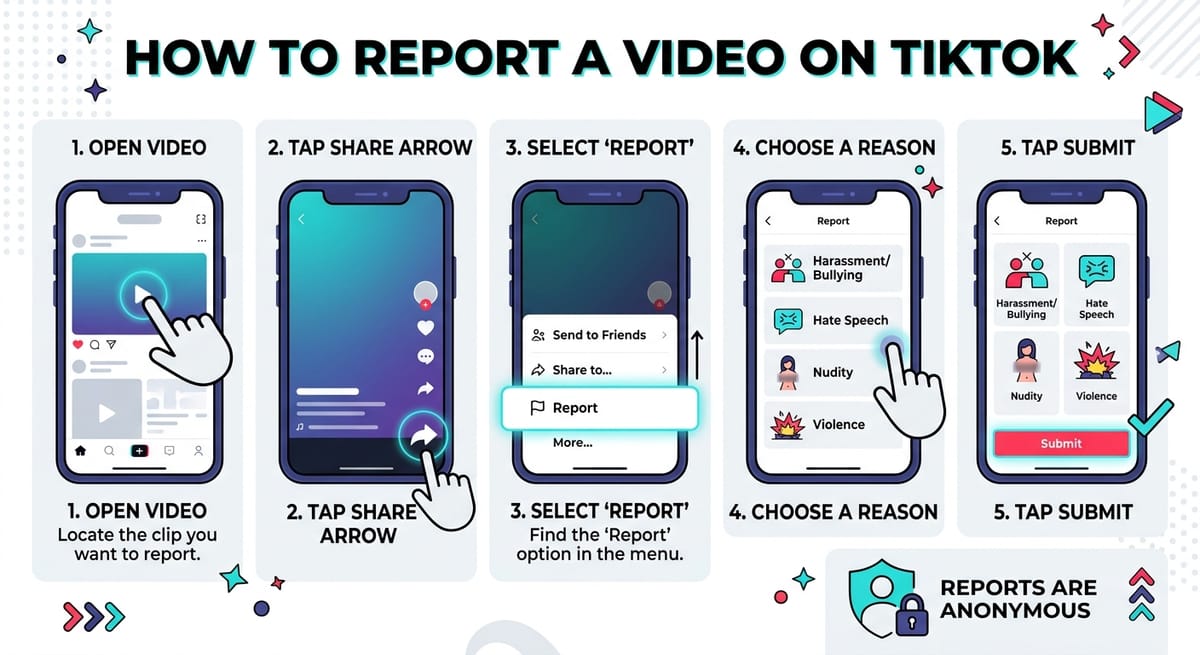
Saw a clip that crossed a line? TikTok lets you flag it in seconds. The report goes to a review team, stays anonymous, and feeds the system that decides what shows up in your feed. Here is how to report a video on TikTok, what each reason means, and what the platform does after you tap submit.
How to Report a Video on TikTok in Four Taps
The flow is short. Follow the order below and you are done.
| Step | Action |
|---|---|
| 1 | Open the clip. Press the share button, the arrow pointing right. |
| 2 | A menu slides up. Choose Report. |
| 3 | TikTok asks for a reason. Pick the one that matches the problem. |
| 4 | Press Submit near the bottom of the screen. |
Your report is in the queue. Nothing else is required from you.
If the problem sits in the replies under your own post instead of in a clip, the fix is different. Our walkthrough on setting up comment filters covers that side.
Picking the Right Reason When You Report a Video on TikTok
Step three is where people hesitate. TikTok lists several categories and you choose one. These four come up most.
| Category | Use it for |
|---|---|
| Harassment and Bullying | Clips aimed at hurting or targeting a person |
| Hate Speech | Hateful remarks or hateful material |
| Violence or Dangerous Acts | Violent scenes or risky stunts |
| Nudity or Sexual Activity | Bare or sexual material |
More options sit below those four. Scroll and read them before tapping, so the label matches what you saw.
Certain words showing up under your videos again and again? You can block specific keywords from your comment section and stop seeing them without reporting anyone.
What Happens After You Report a Video on TikTok
Reports land with TikTok’s moderation team. They check the clip against the Community Guidelines every account agrees to. The clip may come down, the uploader may get a warning, or the account can be suspended.
Reports are one input among many. TikTok reported that it removed 184,012,576 videos worldwide in the first quarter of 2026, roughly 0.5% of everything uploaded.
The reasons behind those removals cluster around a handful of policy areas.
- Sensitive and mature themes — 18.6%
- Dangerous activities and challenges — 16.5%
- Body exposure and sexualized behavior — 12.9%
- Safety and civility — 12.6%
Share of removed videos by policy category. Source: TikTok Q1 2026 Community Guidelines Enforcement Report.
The reinstatement figure matters. Almost 9 million clips came back after a second look, so review is not a one-way door.
Creators broadcasting in real time work with a separate toolkit. Our guide to running moderation during a TikTok LIVE covers mutes, blocks and assigned moderators.
Does the Uploader Know When You Report a Video on TikTok?
No. TikTok keeps your identity out of the process. The person who posted the clip never learns who flagged it.
Your report stays private from the first tap to the final decision. That anonymity is the reason there is no need to hesitate over a clip that bothers you.
Want fewer strangers near your own profile? Switching to a private TikTok account takes three taps, and the privacy playbook for creators explains what a public profile gives away.
Report a Video on TikTok and What It Does to Your Feed
Reporting also acts as a signal. TikTok reads your interactions when it decides what to serve next, and a report tells it you want less of that.
Pair it with the Not Interested option on similar clips for a faster shift. Creators watching their own reach can check who has been visiting their profile for a different angle on the same data.
Quick Recap of How to Report a Video on TikTok
| Question | Answer |
|---|---|
| Where do I start? | The share arrow on the clip |
| What do I tap next? | Report |
| Do I need to explain? | Just pick a reason from the list |
| How do I finish? | Tap Submit |
| Who sees my name? | Nobody |
Two minutes of learning covers you for the day it matters. Reports feed a system that already removes most violations on its own, and yours catches what the machines miss.
Accounts with reach carry extra risk, so it helps to read up on protecting creator logins and audience data before trouble finds you. Building a public presence? Start with TikTok’s verification requirements.
FAQs
How do I report a video on TikTok?
Open the clip, tap the share arrow, choose Report, select a reason from the list, then tap Submit. The whole process takes under a minute and needs no written explanation.
Does someone know if you report their TikTok video?
No. TikTok never tells the uploader who filed a report. Your identity stays hidden throughout the review, and the creator only sees the outcome if their clip is removed.
How long does TikTok take to review a reported video?
Most reviews finish within 24 to 48 hours. TikTok removed 94.4% of violating content within a day of posting in Q1 2026, though complex cases can take longer.
What happens if a TikTok video gets reported?
Moderators check the clip against Community Guidelines. Outcomes include removal, a warning to the uploader, restricted distribution, or account suspension. Clips that break no rules stay up.
Can you report a TikTok video without an account?
No. Reporting requires a logged-in TikTok account. Without one, you can still contact TikTok through its feedback form on the support site, though response times are slower.