
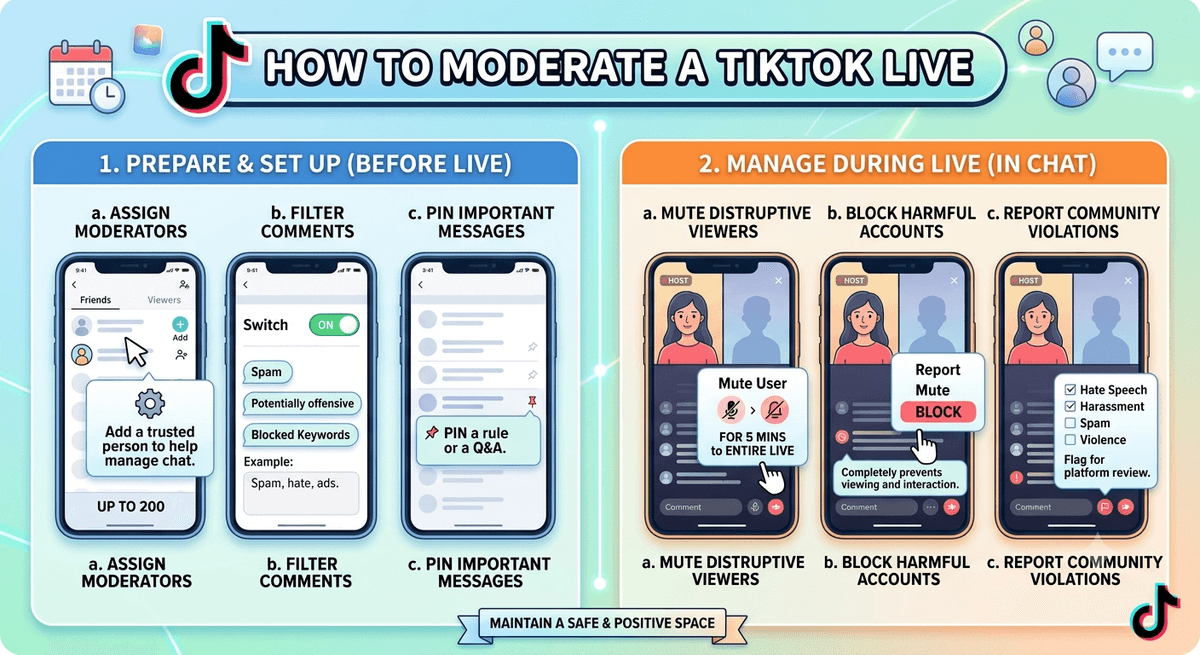
Most brands think about moderation only after a stream falls apart. Messages pour in, real questions slip past, the presenter loses the thread, and the session drifts. By then it is too late. Learning how to moderate a TikTok LIVE belongs in your plan from the start, not as a patch. A LIVE runs in real time, so chat, reactions, and side noise land at once. TikTok gives you built-in controls, but they cannot do the whole job alone.
Why Control Slips Away During a TikTok LIVE
With edited clips, you own every detail. On a stream, that grip loosens because viewers shape where the chat goes. That is what makes going live strong, and also what makes it tricky.
Skip the planning and you react instead of steer. You follow the room instead of leading it. A solid setup keeps people watching, and steady moderation keeps that setup safe.
What It Means to Moderate a TikTok LIVE
People assume it means deleting rude messages. That is only a slice. Real moderation covers picking which comments earn a reply, deciding which topics get airtime, and setting the pace of the whole session.
TikTok lets hosts and their helpers manage chat as it happens, but the button is not the plan. Keep in mind that only accounts past the follower threshold for going live on TikTok can open a stream in the first place.
Set Up TikTok LIVE Moderation Before You Stream
The easiest moderation happens before anyone joins. From the LIVE settings screen, you can filter keywords and their variations, restrict comments, and assign moderators who carry the role into future streams.
During the broadcast, tapping a viewer’s profile opens options to report, mute for a set duration, or block. A blocked account cannot rejoin your LIVE. All of this sits under TikTok’s community rules, so the platform hides some violating comments on its own even when your filters are off.
Why One Host Cannot Moderate a TikTok LIVE Alone
Asking the presenter to do everything is a common slip. That person already speaks to the crowd, keeps energy up, and plans the next beat. Add chat duty and quality drops. Good questions vanish and the stream feels sloppy.
| Role | Main job |
|---|---|
| Presenter | Speaks, keeps energy up, holds interest, plans ahead |
| Helper | Watches the chat, screens noise, replies to key questions |
Skip that split and the stream gets harder to steer with every extra viewer.
How to Handle Comments on a TikTok LIVE
Chat volume is the biggest hurdle. Replying to everything is neither doable nor useful, so the helper’s job is spotting what counts.
| Give attention to | Let go of |
|---|---|
| Relevant questions | Off-topic chatter |
| High-intent comments | Spam |
| Chances to engage | Repeated noise |
Harsh comments come with the territory. They are not the problem; your response is. Snapping back breaks the flow, and letting things slide loosens your grip. Mute, block, or filter with a calm hand. The point is to guard the stream, not feed the trolls.
Answer the right questions fast and people feel noticed. Clear the noise and the session feels planned. Viewers stay when things feel neat and leave when they feel loose.
Moderation as a Growth Tool, Not Just a Shield
Most brands treat moderation as defence. That is half the picture. Push the best questions forward and interaction climbs. Keep the stream on point and watch time grows, which matters if you plan to earn money from your TikTok content through gifts or brand work.
The same logic applies to reuse. Many brands cut stream footage into short posts, sometimes layering a storyteller voice over or the popular Jessie TikTok voice on top. A clean, well-run stream produces clips worth reposting. A chaotic one does not.
Build a Repeatable Moderation System
Brands that do well skip the react-and-scramble habit. They name roles up front, fix rules before the stream, decide what matters most, and repeat the routine every session. Do it often enough and control turns automatic.
Plenty of brands still write this off. They pour effort into looks, script, and delivery, then forget the grip. A stream is more than what you say; it is how well you run all of it. For more on growing streams and short-form content, the TTS Vibes blog covers follower growth, LIVE requirements, and creator earnings in detail.
FAQs
What does it mean to moderate a TikTok LIVE?
It means running the chat, guiding the conversation, and keeping control of the session while it airs, including muting or blocking disruptive viewers and surfacing the questions worth answering.
Do you need a helper to moderate a TikTok LIVE?
Yes. A dedicated helper keeps the chat ordered so the presenter can focus on speaking. TikTok allows up to 20 moderators per LIVE session.
How do you handle comments on a TikTok LIVE?
Use TikTok’s built-in tools: mute viewers for a set duration, block accounts, filter keywords before the stream, and report violations. Prioritize relevant questions and ignore spam.
Can a moderator end my TikTok LIVE?
No. Moderators can mute, block, filter keywords, and report viewers, but only the creator can end the broadcast or change account settings.
Can good moderation lift how a TikTok LIVE performs?
Yes. It raises interaction, keeps viewers watching longer, and makes the session clearer, all of which feed the signals TikTok uses to surface streams.