How to Pin a Comment on TikTok?

Maxime Dupré
9/7/2026
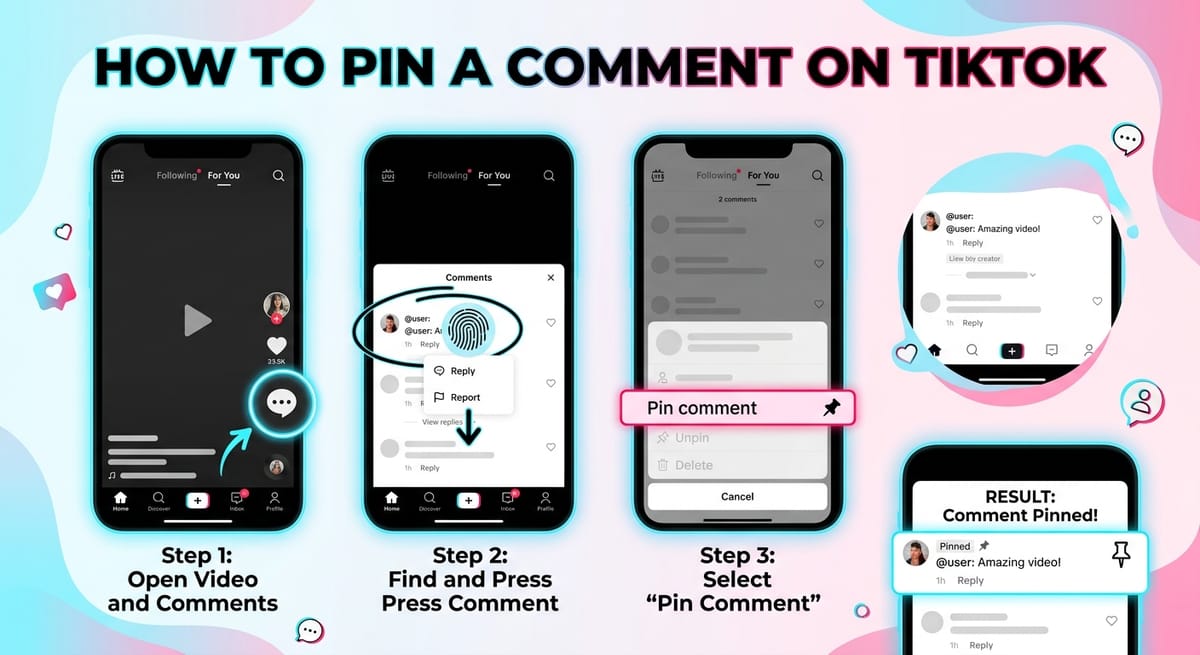
A sharp reply or a question that keeps coming back deserves the top slot. On a video that picks up speed, it sinks within minutes.
Pinning stops that. One comment holds the top of the section until you move it. Here is how to pin a comment on TikTok, how to swap or clear a pin, and what changes during a LIVE.
Why Pin a Comment on TikTok
The pinned slot is the first thing viewers read when they tap into the comments. That makes it useful for a few jobs.
Answering a question dozens of people asked saves you typing the same reply forty times. Pinning a viewer’s compliment puts social proof at eye level. A pinned line from you steers the tone before anyone else sets it.
Creators also use the slot for context the caption could not fit. A product name, a correction, where a clip was filmed.
How to Pin a Comment on TikTok on iPhone and Android
The steps match on both. Pinning works inside the TikTok app only, and only on videos you posted.
- Open TikTok and go to the video holding the comment you want to highlight.
- Tap the speech bubble icon to open the comment section.
- Scroll until you find the reply that deserves the top.
- Press and hold it until a menu slides up from the bottom.
- Tap “Pin comment”.
Some handsets show a three-dot icon beside each comment instead of the hold menu. Tap it and pick the same option.
The comment moves to the head of the list straight away. Everyone who opens the section sees it before anything else.
How to Change or Unpin a Pinned Comment on TikTok
TikTok allows one pinned comment per video. Adding a second replaces the first.
Press and hold the new comment and choose “Pin and replace”. To empty the slot instead, hold the pinned comment and tap “Unpin”.
Swapping costs nothing, so rotate the pin as better replies land. Removing the upload clears the pin along with everything attached to it, and deleting a TikTok video takes seconds if that is the route you want.
Can You Pin a Comment on TikTok LIVE?
Yes. Hosts and assigned moderators can pin a chat comment mid-broadcast by holding it and choosing the pin option.
LIVE pins behave differently from video pins. They sit on screen for a short stretch, then drop away on their own. Re-pin the message to keep it up, or repeat it on camera.
Hand pinning rights to a trusted moderator before you start streaming, since you will be busy hosting. The walkthrough on starting a TikTok broadcast covers that setup.
Why the Pin Comment Option Is Missing on TikTok
Nothing happens when you hold a comment? Run through these.
- You are on the desktop site. Browsers carry no pinning tool, so viewing TikTok outside the app works fine, but pinning does not.
- The video is not yours. Only the account that posted it can pin.
- Your app build is old. Update it, then restart the phone.
- The comment broke Community Guidelines and TikTok pulled it. Spam and hateful replies lose the slot.
A fair number of creators report the option missing on their own uploads even after updating. TikTok has documented nothing about it, in either direction. No account setting brings it back.
Managing TikTok Comments Beyond Pinning
A pin curates. It does not moderate.
Reply as well as pin, because people notice when a creator answers, and active threads feed back into reach. Keyword filters hide replies containing words you pick, and shutting out a problem account ends a repeat offender permanently.
Volume matters too. Comment counts track view counts closely, so pulling in more views does more for your section than any single pin.
Vary how you respond. Replying with a photo lands differently from plain text, and resharing a clip puts you in front of people who missed the first pass.
Posting on a steady schedule sits underneath all of it. Pins highlight a conversation; regular uploads are what grow a following in the first place.
FAQs
Can you pin your own comment on TikTok?
Yes. Post a comment under your video, press and hold it, then tap “Pin comment”. It takes the top slot like any other pinned reply.
How many comments can you pin on TikTok?
One per video. Pinning a second comment replaces the first, so use “Pin and replace” whenever you want to swap the highlighted reply.
Can you pin a comment on TikTok from a computer?
No. The desktop site carries no pinning option. Pinning works only inside the TikTok mobile app on iPhone and Android.
Why did my pinned comment disappear?
TikTok removes pinned comments that break Community Guidelines, and authors can delete their own replies. Pin a replacement to fill the empty slot.
Can moderators pin comments during a TikTok LIVE?
Yes. Hosts and moderators with pinning rights can hold a chat comment and pin it. LIVE pins are temporary and clear on their own.