How To Add A Question Sticker On Tiktok?

Maxime Dupré
9/10/2026
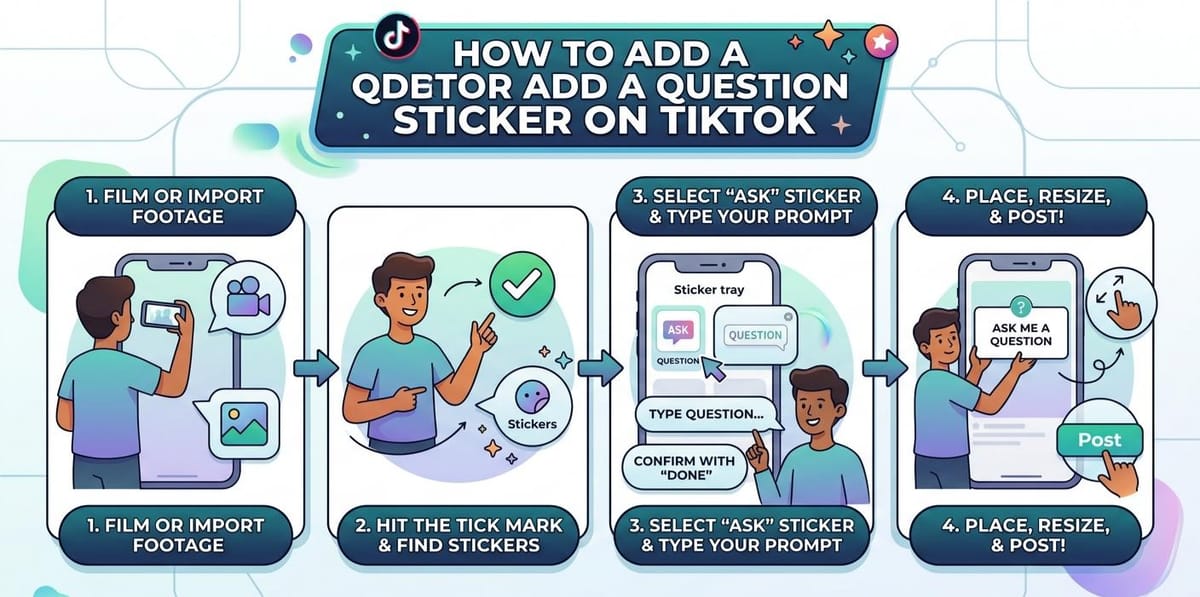
The Ask sticker drops a written prompt straight onto your clip. It lives in the TikTok editor, so you reach it after the footage is ready and before the post goes out. Anyone can place one, and the whole thing takes under a minute.
Here is how to add a question sticker on TikTok in September 2026. Every step happens inside the app. No browser, no desktop, no setting to switch on first.
How to Add a Question Sticker on TikTok Step by Step
- Open TikTok and press the plus icon along the lower edge.
- Film fresh footage, or pull in a clip already saved on your phone.
- Hit the tick mark. That moves you into the editor.
- Find the Stickers button. It sits down one side of the editor or across the upper area.
- Scroll the tray until Ask shows up. Some accounts see it labelled Question instead.
- Type your prompt, then confirm with Done.
- Slide the box where it looks best. Two fingers stretch it wider or shrink it down.
- Press Next, write a caption, then finish with Post.
Where the Ask Sticker Sits Inside the TikTok Editor
| Order | Where you are | What you press |
|---|---|---|
| 1 | Home feed | Plus icon, lower edge |
| 2 | Camera or gallery | Record, or choose a saved clip |
| 3 | Camera | Tick mark |
| 4 | Editor | Stickers |
| 5 | Sticker tray | Ask or Question |
| 6 | Text field | Your prompt, then Done |
| 7 | Editor | Drag and pinch to size |
| 8 | Post page | Next, caption, Post |
Film or Import First, Then Add the Question Sticker
Nothing happens while the camera is rolling. The tray only opens once you accept your take with the tick mark, which is why recording always comes first.
Import works the same way. A clip lifted from your gallery still passes through the editor, so the tray waits there either way. If you have already paired a clip with someone else’s video, the flow will feel familiar.
Sizing and Placing the Question Sticker on TikTok
Once the wording is confirmed, the box behaves like any other movable element. Hold it and slide it until it sits somewhere clear of faces and captions.
Pinching with two fingers changes how large it appears. These small edits happen before Next, not after. Creators who spend time in the comment area may also want to keep one reply parked at the top or screen replies before they appear.
Quick reference for the Ask sticker
| Item | Detail |
|---|---|
| Sticker name | Ask, shown as Question on some builds |
| Where it opens | Stickers tray inside the editor |
| Entry point | Plus icon on the main screen |
| Confirm wording | Done |
| Move it | Drag with one finger |
| Resize it | Pinch with two fingers |
| Final action | Next, caption, Post |
Posting the Clip After You Add a Question Sticker
Next is the last button in the editor. Tapping it carries you to the caption page.
Write the caption there, then Post pushes the clip out with the prompt already sitting on top. Nothing else has to be switched on. A caption built around terms people actually search for gives the video a second route to viewers.
Why the Question Sticker Is Missing on TikTok
The tray rotates. If Ask does not appear, scroll the full sticker list rather than the first row, since the option often sits several swipes across.
An outdated app version is the other common cause. Update TikTok, close it fully, then reopen the editor. Accounts set to private mode still get the sticker, though far fewer people see the prompt.
Once the clip is live, reading the performance numbers tells you whether the prompt pulled replies. Heavy comment traffic is easier to handle if you also mute specific words ahead of time.
FAQs
How do you add a question sticker on TikTok?
Tap the plus icon, record or import a clip, press the tick mark, open Stickers in the editor, select Ask, type your prompt, tap Done, then post the video.
Why can’t I find the question sticker on TikTok, according to Reddit?
Reddit threads point to two fixes: scroll the entire sticker tray instead of the top row, and update the app. The label also varies, appearing as Ask on some builds.
Can you answer a question sticker on TikTok?
Yes. Viewers reply in the comments, and you can record a response video from that comment. The reply then appears on screen inside your new clip.
Is the Ask sticker the same as TikTok Q&A?
They overlap but differ. The Ask sticker sits on one video as a written prompt. Q&A collects questions across your profile and links them to answer videos.
Do question stickers boost engagement on TikTok? What does Reddit say?
Reddit creators report more comments on clips carrying a prompt, since replying feels easier than commenting cold. Views depend on the video itself, not the sticker.