Kiddle The Child-Safe Site Parents Confuse With Google

Maxime Dupré
8/18/2026
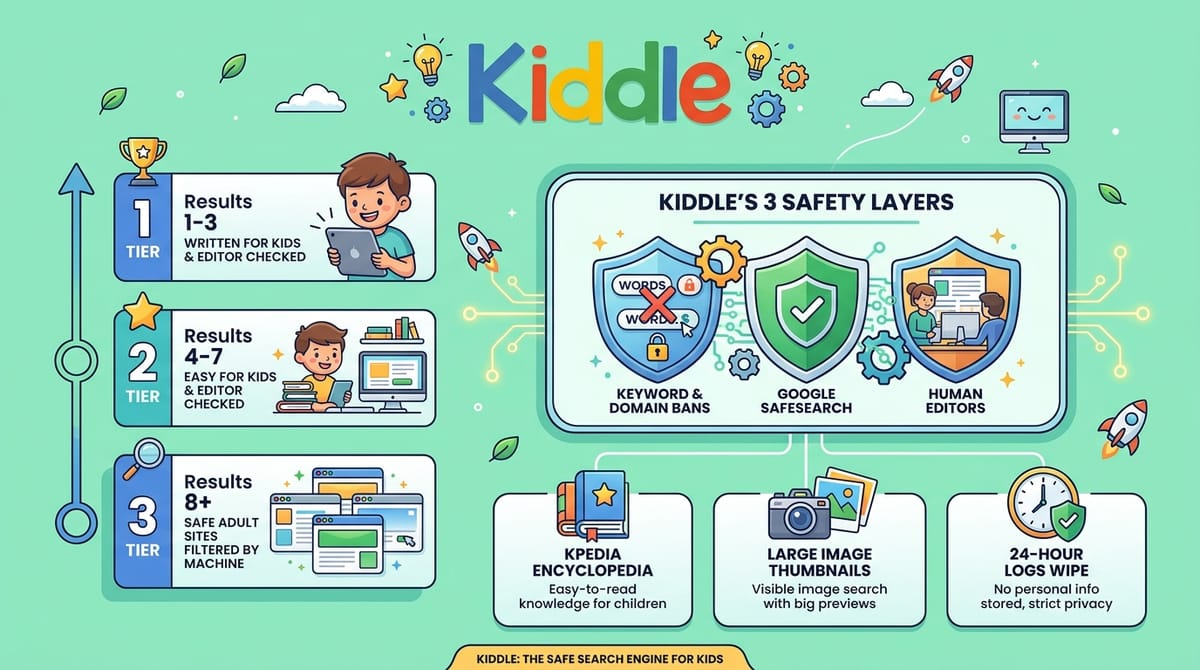
Kiddle looks like Google, runs on part of Google’s plumbing, and blocks most of what worries parents. Editors check the leading results before children reach them. The filtering is strict, sometimes strict enough to break an ordinary search. Below: what Kiddle blocks, who actually runs it, how its results differ from Google, and how to set it as the default engine in Chrome.
What Kiddle blocks and what the kids search engine adds
Kiddle bars obscene wording, swearing, violence and adult themes at both ends of a search. Type one and the screen answers with “Oops, try again!” rather than a results page.
Three layers do the work. The first blocks chosen keywords and whole domains, covering ordinary adult sites plus social apps such as WhatsApp, Instagram, YouTube and TikTok. The approach mirrors muted keyword filters on TikTok comments, only applied across an entire index.
The second layer is Google SafeSearch, which strips explicit material from what gets listed. The third is human. Editors vet the top hits, normally across the opening seven positions.
Kpedia supplies the featured answer at the top of many result pages. It is an in-house version of Wikipedia, with entries lifted from there and reworded for younger readers. Image search pulls from the open web and from Kpedia itself.
Spanish works across web and image lookups without its own tab. Search under Web and Spanish Kpedia entries surface when they exist, which helps if a child is also doing listening practice in a second language.
Kiddle vs Google: how the result pages differ
| Point | Kiddle | |
|---|---|---|
| Look | Plain layout, larger Arial type | Standard layout |
| Results page | Kpedia featured result, then filtered picks with large thumbnails on the left | AI answers, People also ask, Learn more blocks |
| Order of hits | First three written for children; four to seven vetted; eight onward filtered by machine | SafeSearch removes explicit sites, though unsuitable pages still slip through |
| Data handling | States it collects no personal data and wipes logs every 24 hours | Built to collect user data |
Does Google own Kiddle?
No. The logo copies Google’s colours in a barely altered shade and the name puns on it, but the two are separate businesses with no ownership tie. Kiddle uses Google SafeSearch as a supplier, nothing more.
The data picture is muddier than the privacy claim suggests. Kiddle leans on Google cookies and serves targeted Google adverts, so a child’s browsing still feeds the same machinery. Parents who want a fuller sense of what a session leaks can read this breakdown of how much a profile gives away.
Is Kiddle good for homework and everyday searches?
Broad primary and middle-grade subjects hold up. Holidays, animals and arithmetic all return Kpedia entries and vetted pages, which pairs well with drill sites such as structured times table practice.
Older pupils hit a wall fast. “HTML language,” “Emily Dickinson poems” and “economic impacts of COVID-19 pandemic” returned little worth reading.
Even simple queries fail. “Fastest motorbike” brought back nothing. “Ho Chi Minh City” produced the same “Oops, try again!” screen, which is odd for a city of nine million. Nothing surfaced for the words to Let It Go, for biophilic design, or for the Luzon Datum of 1911.
Treat kiddle.co as a large edited encyclopedia rather than a search engine. Approved sites still let children play tic-tac-toe or word shake, and topics like patterns and numbers in nature or browser-based math games fit its reading level well.
Social apps are mostly walled off. Snapchat, Facebook and TikTok get no direct link, though pages about them come back. YouTube is banned outright, yet clips still play when embedded in cleared sites such as khanacademy.org and ed.ted.com.
How to set Kiddle as the default search engine in Chrome
Desktop
- Open Chrome, click the three-dot More icon at top right, then Settings.
- Choose Search engine in the sidebar.
- Beside Site search, click Add and enter Name: Kiddle, Shortcut: kiddle, URL: https://www.kiddle.co/s.php?q=%s
- Press Save, click the More icon next to the new entry, then pick Make default.
iOS and Android
- Open m.kiddle.co in the Chrome app and run three or more searches.
- Tap the More icon, top right on Android and bottom right on iOS.
- Open Settings, then Search engine.
- Under Recently visited, pick kiddle.co. If it is missing, visit the site a few more times.
Default status has limits. A child can still type a banned address straight into the bar, or route around the filter through web proxies such as Blockaway. Pair the engine with device-level parental controls and with tighter privacy settings on any social accounts a child already holds.
FAQs
Is Kiddle owned by Google?
No. Kiddle uses Google SafeSearch and Google Programmable Search, but the two companies have no ownership link. The similar logo colours and the name are deliberate echoes, not a corporate connection.
Is Kiddle safe for young children?
Kiddle blocks explicit terms, adult sites and social apps, and editors vet the first seven results. Filters are not perfect, so supervision still matters, especially past the eighth result.
Does Kiddle block YouTube?
Yes. Searching YouTube returns the “Oops, try again!” screen and the domain has no direct link. Videos still play when embedded inside approved sites such as khanacademy.org and ed.ted.com.
What is Kpedia on Kiddle?
Kpedia is Kiddle’s in-house encyclopedia. Entries come from Wikipedia and are rewritten in simpler language, then shown as the featured result at the top of many Kiddle search pages.
Does Kiddle collect personal data?
Kiddle states it collects no personally identifiable information and deletes log files every 24 hours. It still relies on Google cookies and displays targeted Google adverts alongside results.