How To Add A Link To Your TikTok Bio

Maxime Dupré
9/23/2026
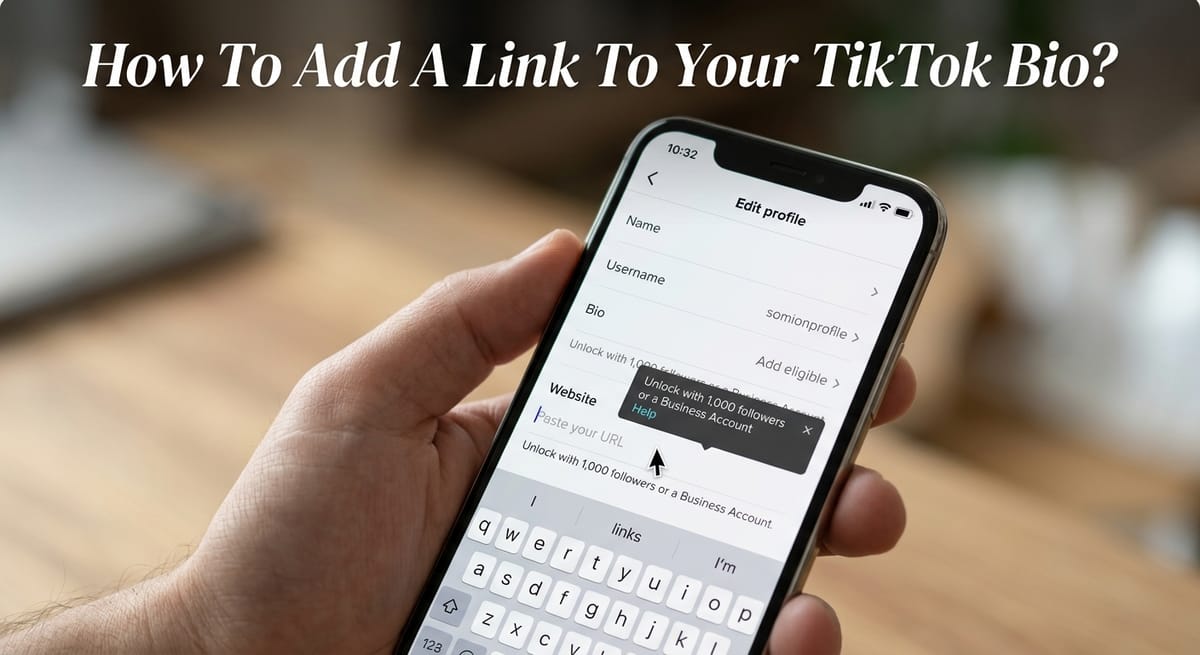
TikTok gives eligible profiles one clickable website field, placed right under the bio text. You unlock it with 1,000 followers or a business account.
Setup happens in the mobile app and takes four taps. Below you’ll find those taps, the rules on who qualifies, the URLs TikTok turns away, and how to flag a risky link on someone else’s page.
How to Add a Link to Your TikTok Bio in 4 Taps
Open the TikTok app on your phone or tablet. Many users never see the link option on desktop, so stick with mobile.
Tap the Profile icon in the bottom-right corner of the screen.
Tap Edit profile, just below your follower count.
Tap Add next to the Links field. Some app versions label it Website.
Paste your URL, tap Save and finish any on-screen prompts.
Head back to your profile and tap the new link once. If the page loads, it’s live.
Don’t paste the URL into the bio text box. Text there stays plain, and nobody can tap it.
TikTok allows a single clickable website. Creators who need several destinations use a link-in-bio page such as Linktree. A shortened Bitly URL also lets you count clicks next to your TikTok analytics numbers.
Do You Need 1,000 Followers to Put a Link in Your TikTok Bio?
No, not if you run a business account. TikTok opens the bio link field to two groups:
Personal or creator accounts with 1,000 followers or more.
Business accounts, with no follower minimum at all.
Anyone outside those groups sees the username, name and bio fields. The link option simply isn’t there.
Switching to a Business Account
Switching costs nothing. Go to Profile, tap the three-line menu, then Settings and privacy, Account, and Switch to Business Account. Our walkthrough on changing to a TikTok business profile shows each screen.
There’s a trade-off. Business accounts lose some copyrighted sounds, because not every track carries a commercial license. In some regions, TikTok also asks accounts under 1,000 followers to register the business with a legal name, address and license ID.
Regret the move? You can go back to a personal account from the same menu.
Reaching 1,000 Followers
Personal accounts keep the full music library. The catch is timing. The field doesn’t always appear the moment you pass 1,000, and some creators wait a couple of days.
Why Can’t I Add a Link to My TikTok Bio? 5 Common Causes
A missing or broken link field usually traces back to one of these.
Your personal account sits below 1,000 followers. Switch to business or keep growing.
You’re on desktop or a mobile browser. Open the TikTok app instead.
You typed the URL into the bio description. Move it to the Links field.
TikTok blocked the domain. It rejects spammy or unsafe URLs, and the field may clear after you tap Save. Try your own clean domain.
The feature hasn’t reached your account yet. Force-close the app, reopen it, or wait a day. If months pass, use Report a problem inside Settings and privacy.
Still under the threshold? Write a short, easy-to-type URL in your bio text. Then repeat it in a pinned comment under your most-watched video, where viewers can copy it.
Which URLs TikTok Accepts in the Bio Website Field
TikTok dropped support for URLs that launch another social app or sign users into one. Regular web addresses still go through.
Personal or business website: allowed.
Web address of a profile on another social platform: allowed.
A URL that opens or logs into another social app: not allowed.
The fix is easy. Paste the browser version of your other profile, and fans reach it through a normal site rather than the app.
In certain regions, the Links section also lets you connect a Lemon8 account. Many creators point their main link at a portfolio of past work or a store. Others send it to a site they own outright, which is the case for keeping a home base off TikTok.
TikTok’s In-App Browser and Bio Link Safety Rules
Tap a bio link and the page opens inside TikTok’s built-in browser. To block scams, phishing and malware, TikTok caps how far you can click through chains of outside pages there.
Those caps apply to every account. Sometimes a prompt will ask you to open the site in your phone’s regular browser instead.
Check that a site is genuine before you type a password or card number into it. TikTok’s help center has a page on spotting phishing attempts, and this rundown of creator security risks in 2026 covers the common traps.
If you’re the one sharing, aim the URL at the exact page you want people to see. A visitor who lands on a cluttered homepage may leave after one or two taps.
Your bio says more about you than the link alone. See what else it reveals in our privacy playbook for TikTok creators, and lock down logins with these account security habits.
Reporting a Suspicious Link in Someone’s TikTok Bio
Found a bio link that looks like a scam or breaks TikTok’s Community Guidelines? You can flag it without leaving the app.
Tap the link on that creator’s profile.
Press the three-dot button at the top of the screen.
Choose Report and complete the prompts.
When the whole profile is the problem, not just one URL, follow the steps to flag a TikTok account instead.
FAQs
How do I make a link clickable on TikTok?
Add it to the Links field under Edit profile, not the bio text. That field unlocks at 1,000 followers or with a business account. URLs typed into the bio description stay plain and can’t be tapped.
Can you add a link to your TikTok bio without 1,000 followers?
Yes. Switch to a free business account through Settings and privacy, then Account. Business accounts get the website field with no follower minimum, though they lose access to some copyrighted sounds.
How many links can you put in a TikTok bio?
TikTok allows one clickable website link. Creators who need more use a link-in-bio page such as Linktree, which holds several destinations behind a single URL.
Can you link your Reddit profile in your TikTok bio?
Yes. Paste the web address of your Reddit profile or subreddit into the Links field. TikTok opens it in its in-app browser. Links built to launch or sign into the Reddit app aren’t supported.
How can small creators send TikTok viewers to Reddit without a clickable link?
Type a short Reddit URL into your bio text and repeat it in a pinned comment. Viewers copy and paste it. For a tappable link, reach 1,000 followers or switch to a business account.