How to Switch Back to a Personal Account on TikTok

Maxime Dupré
8/22/2026
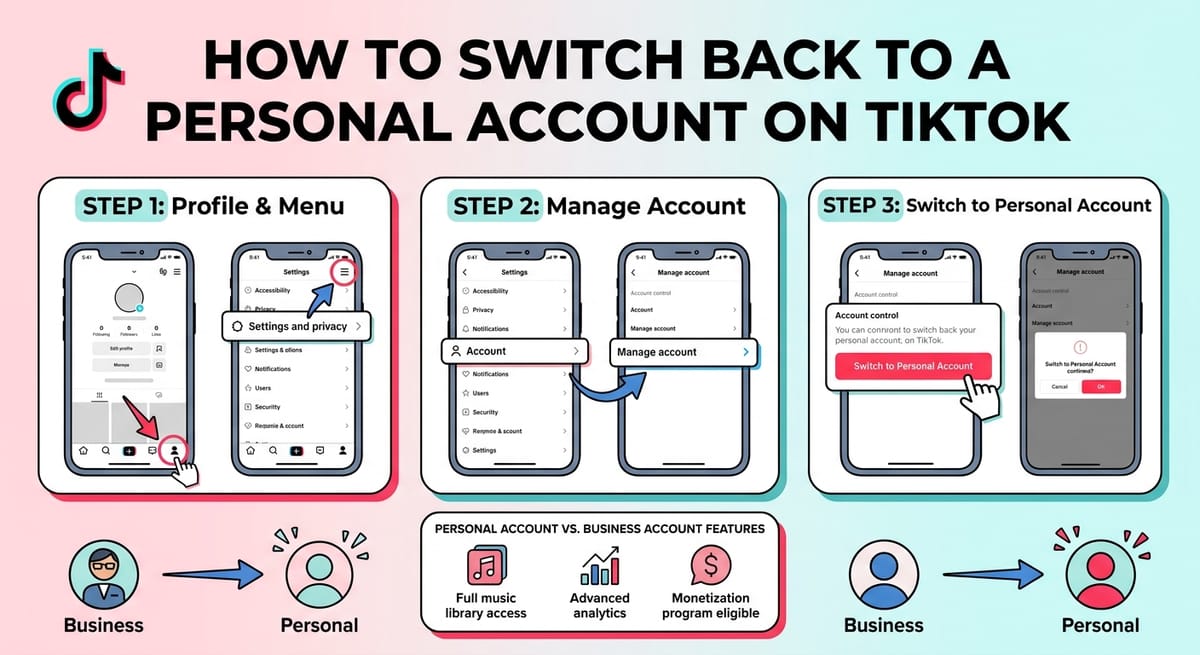
Tapped the wrong button and ended up on a business profile? The change is reversible, and it takes under a minute. The control sits inside Manage account. Your videos, followers and username stay exactly where they are. What shifts is your access to analytics, your bio link and the music you can use. Here is how to switch back to a personal account on TikTok.
What Happens When You Switch Back to a Personal Account on TikTok
Know the cost before you tap. A business profile hands over analytics and a clickable website field, and both disappear the moment you revert.
Anything sitting in that website field gets wiped. Copy the URL somewhere safe first if you plan to add it back later.
| Feature | Personal account | Business account |
|---|---|---|
| Full sound library | Open | Commercial tracks only |
| Detailed analytics | Basic | Advanced |
| Website link in bio | Needs 1,000 followers | Available right away |
| Private profile toggle | Yes | No |
| Creator monetization programs | Eligible | Restricted |
Never opened the analytics tab and never used the link? Then the swap costs you nothing at all.
How to Switch Back to a Personal Account on TikTok in 3 Steps
Do this on your phone. The desktop site does not carry these settings.
Step 1: Open your profile and tap the menu icon
Launch TikTok and tap Profile in the bottom bar.
Look at the top right corner. Newer builds show three horizontal lines, older ones show three dots. Tap it, then choose Settings and privacy.
Step 2: Open Manage account
The settings page groups everything under labels: Account, Content and Activity, Cache and Cellular Data, Support and About.
Manage account sits first, right under the Account heading. That page holds your phone number, email, password and your account type controls. Tap it.
Step 3: Tap Switch to Personal Account
Two blocks appear. Account information covers your login details. Account control is where the switch lives.
Tap Switch to Personal Account. A warning pops up telling you your business analytics will go. Confirm, and the profile reverts on the spot. No review, no waiting period.
TikTok Personal Account vs Business Account: Which One Fits
TikTok now runs three types: Personal, Business and Organization. The old Creator account was folded into Personal, so anyone hunting for a separate creator option will not find one anymore.
Business profiles suit shops and brands. They unlock Ads Manager, advanced reporting and third-party scheduling tools, and they pair naturally with opening a TikTok Shop. The trade is real though, since trending audio and most creator payout programs sit behind a wall.
Personal profiles keep the full sound library and stay eligible for rewards programs. Scale matters here: TikTok recorded 1.59 billion monthly active users as of February 2025, up from 465.7 million in 2020, and sound-driven discovery is a large slice of how that audience finds new clips.
2020 — 465.7M monthly active users
465.7M
Q4 2024 peak — 1.69B monthly active users
1.69B
February 2025 — 1.59B monthly active users
1.59B
Figures reported for global monthly active users.
Why Creators Switch Back to a Personal Account on TikTok
Music is the loudest reason. Business profiles pull from a commercial library, so the song everyone is using this week is often out of reach. Creators tracking current voice and audio trends tend to feel that limit within days.
Monetization is the second reason. Gift-based earnings and rewards programs lean toward personal profiles, which matters if you plan on cashing out gifts or want to check estimated earnings before committing.
Privacy comes third. Business profiles are always public. Only a personal profile lets you lock the account down.
Live streaming works on both, but the barrier is followers rather than account type. You still need to clear the 1,000-follower threshold before hosting or co-hosting with someone else.
Can’t Switch Back to a Personal Account on TikTok?
A handful of things block the option or hide it entirely.
- You already reverted, so the button no longer shows under Account control
- Your app version is old and the menu layout has moved
- The phone has no working connection, or a VPN is blocking TikTok’s servers
- The birth date on file is wrong, which limits several account settings
- You are signed in on desktop, where the setting does not exist
Update the app, kill the VPN, and reopen Manage account. If the option still hides, sign out and back in.
Sellers should also check what breaks downstream. Shop tools and seller payment options are tied to business features, and a payout schedule is easier to plan against once you know what TikTok pays creators.
FAQs
How do I switch back to a personal account on TikTok?
Open Profile, tap the menu icon, then Settings and privacy. Choose Manage account, tap Switch to Personal Account, and confirm. The change applies instantly with no approval step.
Will I lose followers or videos if I switch?
No. Followers, videos, likes and your username all stay intact. Only business features drop off, meaning advanced analytics, the website field in your bio, and access to advertising tools.
How long does the switch take on TikTok?
It applies immediately. TikTok imposes no cooling-off period, so you can move between account types whenever you want, though frequent switching is not recommended.
Why is Switch to Personal Account missing from my settings?
You are most likely on a personal account already. An outdated app version, an active VPN, or a desktop login can also hide the option under Account control.
Do trending sounds come back after switching to a personal account?
Yes. The full music library reopens once the switch completes, so you can use popular tracks in new videos again. Older clips keep whatever audio they were published with.