How to Use TikTok Promote in 2026 A Full Walkthrough

Maxime Dupré
7/31/2026
Struggling with weak view counts? Barely any likes or comments? Nothing ever takes off? TikTok Promote might fix that. This guide walks through the basics. You’ll learn what the feature is, how it runs, the ways it differs from standard advertising, and whether it fits what you want from your posts.
What Does TikTok Promote Actually Do?
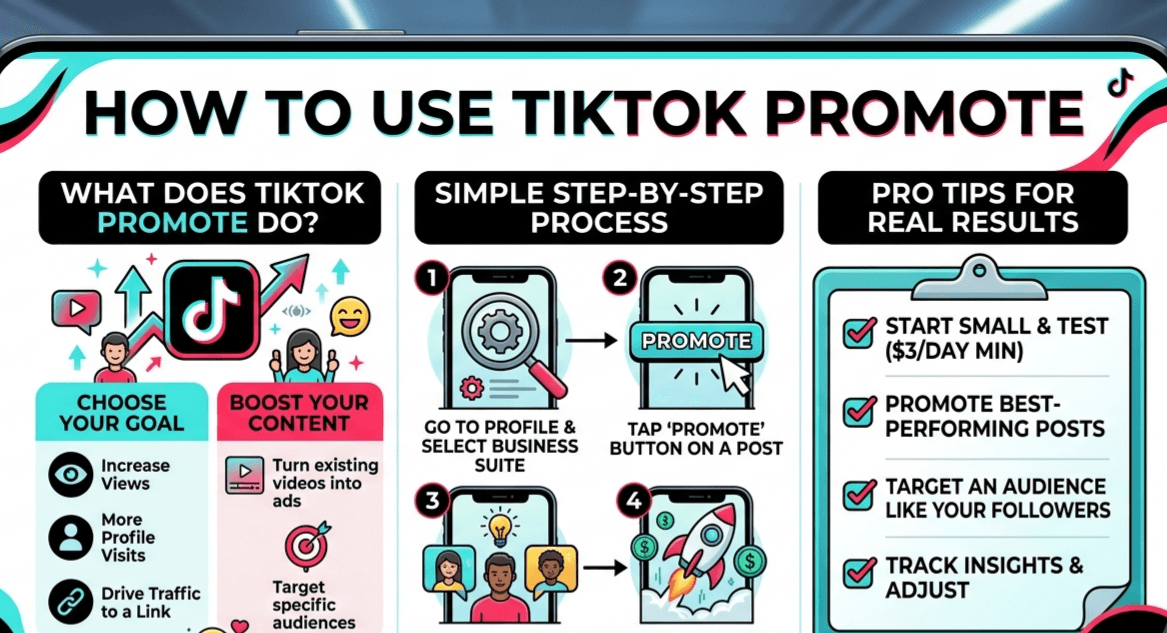
TikTok Promote is an easy tool built to push your best posts further. It converts clips you already shared into paid ads. That way, they land in front of people who don’t follow you yet. Wherever your brand sits right now, the feature comes with goal options that can move you along.
| Drive Conversions | Improve Awareness |
|---|---|
| Product buys on clips and LIVEs | Views on clips and LIVEs |
| Site visits | New followers |
| Direct messages | Profile visits |
| Site conversions | Site visits |
How to Use TikTok Promote: A Step-by-Step Walkthrough
Before the steps, here’s what the feature lets you push:
- Clips you made yourself.
- Ahead of a TikTok LIVE: give your stream a head start so more people tune in.
- While a TikTok LIVE runs: send extra viewers to your broadcast as it happens.
- Someone else’s clip: back a partner’s post for mutual gains.
Now follow along. The example below uses the “Increase Views” goal.
Step 1: Sign in, then flip your profile over to a Business Account. Heads up: newcomers who switch to a Business Account may unlock a 30% off coupon. (Where you live and the timing can affect this.)
Step 2: Open the menu on your profile, pick TikTok Business Suite, then locate “Promote” under More Tools. A shortcut also works: publish a clip, then look for “Increase View” inside More Options.
Step 3: Pick your goal. Grab a ready-made pack, or shape your own audience. After that, decide how much to spend and for how long. Finish by paying. Want to halt a campaign? Open the order and hit “End Promotion.” Whatever cash you didn’t spend flows back to your Promote wallet. Save it for later, or pull it out.
Step 4: Check the numbers your campaign brought in.
TikTok Promote Set Against TikTok Ads
The real gap comes down to how much you steer things. Through Ads Manager, TikTok Ads hands you deep marketing tools and fine-grained settings. Promote keeps everything inside the app and far simpler.
| TikTok Promote | TikTok Ads | |
|---|---|---|
| Setup effort | Quick, very little | Full customization |
| Best suited for | Creators, small businesses | Firms after scale and precision |
| Where it lives | Inside the app | Ads Manager |
| Level of control | Simple, limited | Advanced targeting, budgets, creative |
What Will TikTok Promote Cost You?
| Item | TikTok Promote | TikTok Ads |
|---|---|---|
| Daily spend | $3 to $1,000 | — |
| Run length | 1 to 7 days | — |
| Weekly total | $3 to $7,000 | — |
| Campaign floor | — | $50 |
| Ad group floor | — | $20 |
If you’re just starting, Promote lets you dip in for as little as $3 a day. Bigger spenders chasing advanced tactics will get more from TikTok Ads.
Linking Promote With TikTok Ads Manager
Connecting the two takes little effort. Doing so brings a handful of perks:
- Read every campaign report from one desktop screen.
- Run your campaigns from a phone or a computer with ease.
- One shared money pool, topped up in seconds.
- Dig deeper and sharpen results using Pixel.
- Reach goals lower down the funnel, such as conversions.
- Let bills settle on their own through autopay.
Is TikTok Promote Really Worth Paying For?
We pulled together comments from creators and threads across Reddit. Most of it wasn’t positive. Here’s the gist.
Hollow engagement:
Plenty of users say the followers and likes feel fake, almost bot-driven. The tally climbs, yet it rings false.
Barely any response:
Views go up, sure. Real reactions rarely follow. Few fresh comments, likes, or true fans show up.
A slump afterward:
Some creators found their next clips flopped once they ran Promote. A handful did worse than before, leaving them unsure the tool helps.
Steep price:
Many feel what they pay outweighs what they get.
Weak interaction paired with little lasting payoff leads most people to the same verdict: the spend rarely earns its keep.
How to Use TikTok Promote and Get Real Results
Our digging suggests the letdowns usually stem from confusion over the tool, not the tool being broken. Winning comes from smart tactics. Try these.
Wake up a quiet account.
Been silent for a bit? Put Promote behind a strong past clip. It can lift likes and chatter, warming your page back up.
Stretch a hit further.
Got a clip doing well lately? Promote can pile on more likes and reactions. That may keep it alive longer, or kick off a fresh surge.
Back older clips for tighter aim.
Posts a few weeks old tend to pay off more. The system studies who watched the first time, so it aims at the right crowd rather than guessing.
Pick posts that already shine.
Go with clips pulling strong numbers. A good rule: at least seven days old with roughly 10,000 views. That gives your campaign the best shot.
Questions People Ask
Will a promoted clip look like an ad?
Yes. Once you push it, TikTok shows the post in an ad slot. Promote is an ad tool that widens reach and lifts engagement by putting your clip before more eyes.
Why won’t my clip pull views?
Common culprits: posting when nobody’s online, skipping hot hashtags, shaky quality, or a fresh account with limits. To turn it around, meet TikTok’s quality bar, browse its hashtag section, lean on a hashtag generator, and time your posts better. Data from more than a million clips points to these slots:
| Day | Time |
|---|---|
| Tuesday | 4 PM |
| Friday | 8 AM |
| Sunday | 2 PM |
What’s the price to push a post?
Budgets bend to your aims, running from $3 each day up to $1,000 daily.
TikTok Shop promo or TikTok Promote?
Shop promo chases sales, lifting product exposure inside the store. Promote casts a wider net for views, followers, and site clicks.