How to Set Up TikTok Ads Manager

Maxime Dupré
7/24/2026
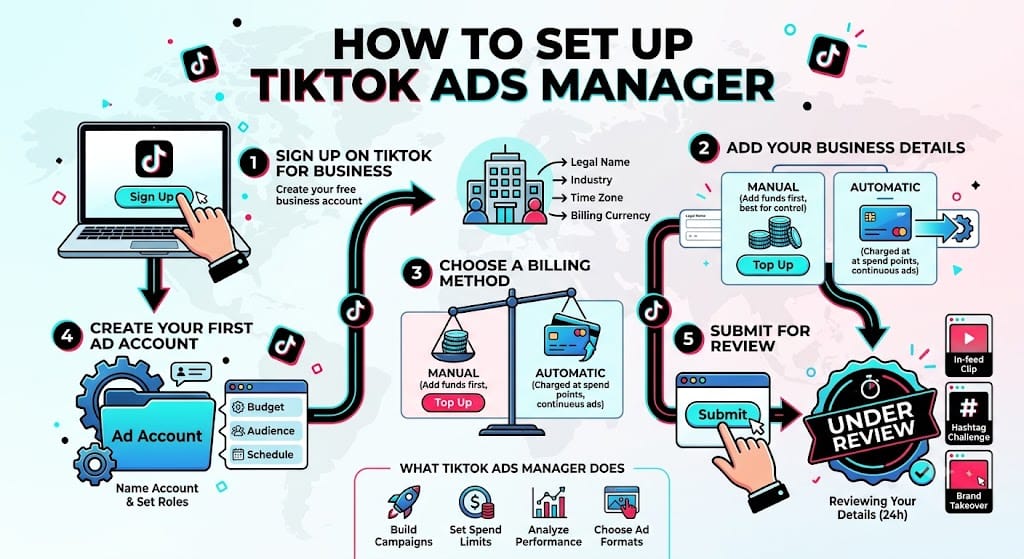
More than a billion people open TikTok every month, which is why paid campaigns on the app keep growing. There’s a gate, though. No ad runs without a TikTok Ads Manager account, and that account sits behind a TikTok for Business login. This guide covers how to set up TikTok Ads Manager, from your first sign-up click to a live campaign.
What TikTok Ads Manager Does
TikTok Ads Manager is one dashboard for the whole campaign. You build ads, launch them, read the numbers, and change what falls flat. It also controls spend limits, placements, and goals like brand awareness, site visits, or app installs.
The tool supports several formats, including in-feed clips, brand takeovers, and hashtag challenges. Before any creative goes live, it helps to get the frame right, so check the correct TikTok video dimensions first.
Why Set Up TikTok Ads Manager
The reach is the obvious draw. Over a billion monthly users sit across many countries, and you can filter them by age, interest, behavior, and device.
Past that, the platform hands you creative aids: video templates, a music library, smart video, and automatic optimization. Reporting runs in real time on views, clicks, and conversions. Budgets stay flexible, so small spenders and big ones both fit.
One reason outweighs the rest. Paid promotion on TikTok does not happen without this tool. Every advertiser uses it.
How to Set Up TikTok Ads Manager in Five Steps
The whole thing takes a short sitting. Work through the steps in order.
Step 1: Sign Up on TikTok for Business
Open the TikTok for Business page and click Sign Up in the corner. A window asks for an email and password. Enter the email carefully, since a verification message lands there later.
Make the password strong with a mix of cases, digits, and symbols, then store it in a manager like 1Password or Psono. Already have a TikTok profile on that email? Click Log In instead. A separate work email still works better, since it keeps personal and company activity apart. Click Next when you’re done.
Step 2: Add Your Business Details
Now TikTok asks about the business. Type the legal name exactly as it reads on official paperwork. Pick the industry that fits best, because that choice sharpens ad targeting.
Choose the time zone with care. It locks after setup and controls when ads run, so match it to where the company sits. Then set the billing currency, and read every field twice before you continue.
Step 3: Choose a Billing Method
Two payment styles exist, and each fits a different advertiser.
| Payment style | How it works |
|---|---|
| Manual | You add funds first, and campaigns pause when the balance hits zero. Best for tight spending control. |
| Automatic | Your card is charged each time spend reaches a set point, often $500. Best for ads that should never stop. |
Adding one is quick. Open the billing area, click the button for a new method, and pick a card or PayPal. Enter your name, card number, expiry, and address, then confirm. Everything has to be current and match the country where the company operates. To set a starting budget, it helps to see what clicks cost across industries before you fund the account.
Step 4: Create Your First Ad Account
Next TikTok prompts you to open an ad account under the business profile. One account covers most needs unless you run large, multi-part campaigns. This is where campaigns, budgets, audiences, and results live.
Give it a clear name so you can spot it if more accounts follow. You can also share access with teammates here through set roles, which keeps the account secure while the right people work.
Step 5: Submit for Review
Click Submit once every field checks out. TikTok’s team reviews the details, usually in under 24 hours. The status shows Under Review during that window, and you can draft campaigns, though nothing runs before approval.
Confirm your business and site meet the ad rules, which block categories like tobacco, weapons, and adult material. To find your account ID later, log in, click the arrow beside your name in the top bar, and read it from the drop-down.
After You Set Up TikTok Ads Manager
Connect the Business Center
The Business Center is a separate tool for teams and larger firms, and linking it to Ads Manager keeps every asset in one place. Need one? Click its icon in your dashboard corner or head to its site.
To link an existing one, open Advertiser Accounts, click Request Access, enter your account ID, and pick a role: Admin, Operator, or Analyst. Admins clear instantly, while the other two wait on an Admin. Sellers should also read the walkthrough on opening a TikTok Shop.
Launch Your First Campaign
Head to the Campaign tab and click Create. Pick a goal such as traffic, conversions, or app installs, then set your audience, budget, and schedule inside the ad group. Choose a format, review, and submit for approval. The full campaign walkthrough covers each level in detail.
Paid reach works harder when your organic posts already rank, so TikTok SEO in 2026 belongs in the same plan. It pairs well with steady work on growing your follower count.
A Quick Recap
Setting up TikTok Ads Manager comes down to five moves: sign up, add business and billing details, create an ad account, pass review, then connect the Business Center. From there the targeting, creative aids, and live reporting give any budget a real shot. If you’re weighing spend against returns, estimate what your account could earn before you commit.
FAQs
How long does TikTok Ads Manager approval take?
Most reviews finish within 24 hours. Your account reads Under Review until then, and you can draft campaigns during the wait, but nothing runs live before TikTok approves the account.
Which industries can’t advertise on TikTok?
Restricted categories include tobacco, weapons, and adult material. Check TikTok’s advertising policies before you submit, since a blocked product or non-compliant site can delay or stop approval.
Can I add teammates to my account?
Yes. Assign roles through the account or Business Center settings. Admins get full control, while Operators and Analysts get limited access that an Admin approves first.
Do I need a personal TikTok account to set up Ads Manager?
No. TikTok Ads Manager runs on a TikTok for Business login. Register with a work email, add billing, and upload creative without linking a personal profile.
How do I improve results after setup?
Read your metrics often, test fresh creatives, and tighten targeting over time. Matching each campaign objective to the action you want also lifts delivery and cuts wasted spend.