How To Use MotionMuse AI

Maxime Dupré
3/20/2026
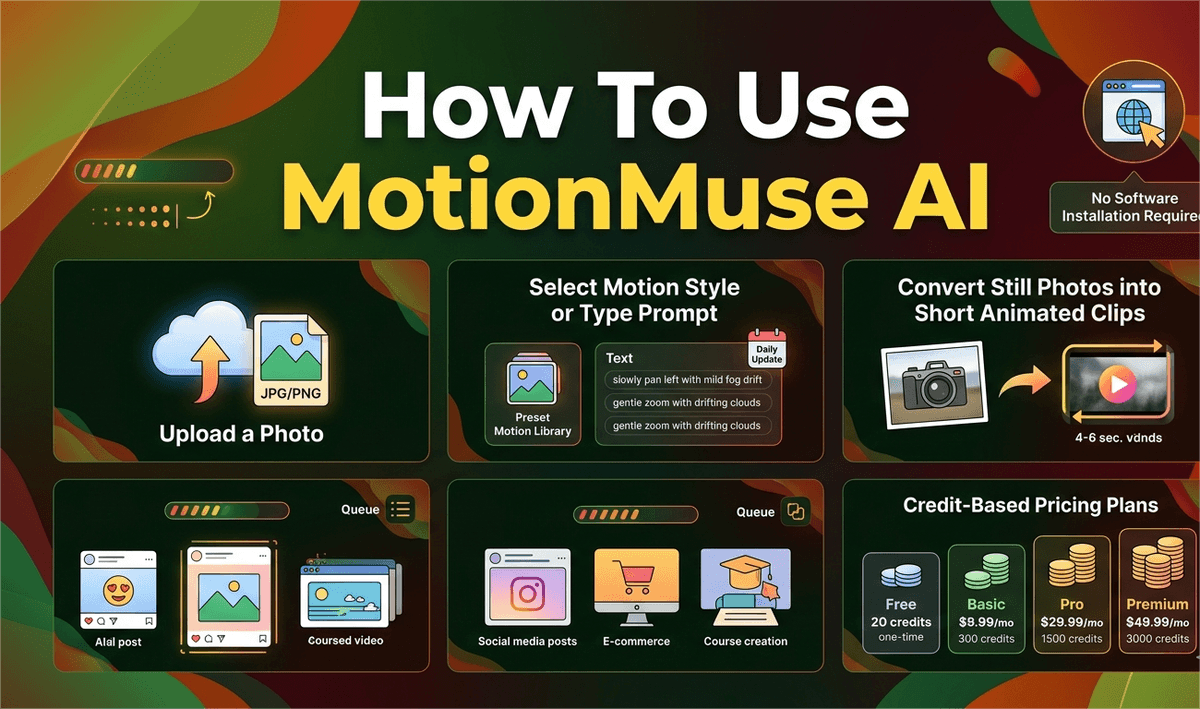
MotionMuse AI is a browser-based tool that converts still photos into short animated clips of four to six seconds. You upload a photo, select a motion style or type a description, and the platform generates a ready-to-download video. No software installation required, no image editing experience needed.
How MotionMuse AI Turns Still Photos Into Animated Clips
MotionMuse AI runs entirely in the browser. It accepts JPG, PNG, and WebP uploads, analyzes the image for depth and structure, then applies movement accordingly. Two input methods are available: a preset library updated daily and a free-text prompt field for custom motion descriptions.
Telling the tool to "slowly pan left with mild fog drift" on a landscape photo produces that specific effect rather than a generic one. Processing runs on MotionMuse servers through a queue system. Higher subscription tiers receive faster queue slots, which matters during peak hours when free-tier users face the longest waits.
For creators already producing short-form content, pairing animated visuals with audio from a TikTok voice generator can add another layer of polish without adding production time.
MotionMuse AI Pricing Plans and Credit Allocation
MotionMuse AI uses a credit model rather than a flat video count. Each generated clip consumes credits from your monthly balance. Unused credits do not carry forward.
| Plan | Monthly Rate | Annual Rate | Monthly Credits | Queue Slots | Top-Up Rate |
|---|---|---|---|---|---|
| Free | $0 | — | 20 (one-time) | Standard | — |
| Basic | $9.99 | $4.99/mo | 300 | 3 | 300 per $10 |
| Pro | $29.99 | $14.99/mo | 1,500 | 10 | 500 per $10 |
| Premium | $49.99 | $24.99/mo | 3,000 | 15 | 600 per $10 |
Every paid tier includes the full preset library, daily template additions, and AI training utilities that let users generate custom animation styles from their own footage.
As these tools become more sophisticated, genai development services can support the development of AI features that make creative workflows more adaptable and personalized.
Key Capabilities of MotionMuse AI for Photo Animation
Beyond basic preset selection, MotionMuse AI covers several specific animation types. Parallax sweeps separate foreground and background layers to create depth. Product rotation effects cycle an object around a center axis. Portrait animations apply subtle facial and hair movement to headshots.
The custom text prompt gives users fine control without requiring technical knowledge. Prompts like "gentle zoom with drifting clouds" or "slow rightward pan with warm light bleed" produce targeted results. The platform processes standard image formats — JPG, PNG, WebP — and maintains source resolution where possible, though compression may apply during delivery.
Animating product photos for ads or course thumbnails pairs well with audio. Creators producing storytelling voiceovers for educational content can attach MotionMuse clips as looping background visuals in their edited posts.
What MotionMuse AI Does Well
The main advantage is speed. A first clip can be generated within a few minutes of account creation. Because the tool runs in a browser, it works across laptops, desktops, and tablets without configuration. The daily preset additions mean the template library stays current rather than stagnating after launch.
Cost compares favorably to freelance animation. Single-project rates from a motion designer often run into the hundreds of dollars. The annual Basic plan at $4.99 per month undercuts that by a significant margin for users with moderate output needs.
Social media managers handling multiple accounts benefit from the queue slot system, which allows concurrent generation requests on Pro and Premium tiers. Understanding which TikTok video dimensions apply to your platform helps ensure MotionMuse exports fit without cropping.
Limitations of MotionMuse AI to Know Before Subscribing
The four-to-six second cap rules out longer storytelling. MotionMuse AI does not generate video from text, edit existing footage, or extend clips beyond that ceiling. Users needing longer-form animation will need a separate tool alongside it.
Free-tier users face slower processing during busy hours since the queue prioritizes paid accounts. Credit balances need active monitoring — running out mid-campaign means either purchasing a top-up or waiting for the next billing cycle. Experienced video editors will notice the absence of frame-level controls, manual curve adjustments, and keyframe editing. The platform is cloud-only, so an unstable internet connection will interrupt generation.
Who Should Use MotionMuse AI for Image-to-Video Conversion
Social media managers who publish at high volume benefit most. The queue slot system and monthly credit scale match production-level output without requiring a dedicated animator on staff.
E-commerce sellers gain a fast route to animated product photos for ads and listing banners. Course creators can transform static diagrams and slide images into looping visual assets. Ad professionals running A/B tests on creative assets can cycle through multiple animation styles quickly without rebuilding assets from scratch.
Animating a visual post alongside strategies to get more views on TikTok gives a post both visual and algorithmic leverage over static image content.
FAQs
What file formats does MotionMuse AI accept for photo animation?
MotionMuse AI accepts JPG, PNG, and WebP image formats. Higher-resolution uploads produce better animation quality in the final clip.
How long are the animated clips generated by MotionMuse AI?
All clips run between four and six seconds. This limit applies across every subscription tier and cannot be extended within the platform.
Does MotionMuse AI support custom animation prompts?
Yes. Users can type a motion description instead of selecting a preset. Specific prompts like "slow leftward pan with mild zoom" produce more accurate results than vague instructions.
Do MotionMuse AI credits roll over to the next month?
No. Monthly credit allocations expire at the end of each billing cycle. Unused credits do not carry forward. Top-up purchases supplement the monthly balance when needed.
Is MotionMuse AI free to use?
There is a free tier with 20 one-time credits. Paid plans start at $4.99 per month on annual billing, with higher tiers offering more credits and faster queue access.