
Live streaming is now a real income source on TikTok. Fans buy Coins, swap them for animated presents, and drop them into a broadcast while it runs. This guide covers how to send a gift on TikTok LIVE, what each present costs, and how a streamer turns those tokens into cash in 2026.
TikTok LIVE Gifts in Simple Terms
A LIVE Gift is a small virtual item a fan buys and shares with a host during a broadcast. It pops up on screen the moment it is sent. The host later converts these presents into Diamonds, a currency that can be cashed out.
Adults who follow the platform’s Virtual Items Policy can gift on any eligible stream. People in the EEA, the UK, and Switzerland fall under two separate rules instead: a Coins Policy covering purchases, refunds, and withdrawal rights, and a Rewards Policy covering how Diamonds are earned and redeemed there.
Who Can Receive Presents on a Stream
A host must meet a few conditions before fans can gift them. They need to be 18 or above (19 in South Korea), based somewhere the feature exists, and running a personal profile in good standing under TikTok’s rules. Business profiles do not qualify. Accounts tied to governments, politicians, or political parties cannot collect Diamonds either.
Gifting also has to be switched on manually. The host opens their Profile, taps the three-line menu, goes to Settings and Privacy, picks Creator Tools, then LIVE Gifts, and finishes the on-screen steps. A separate toggle covers Video Gifts on uploaded clips.
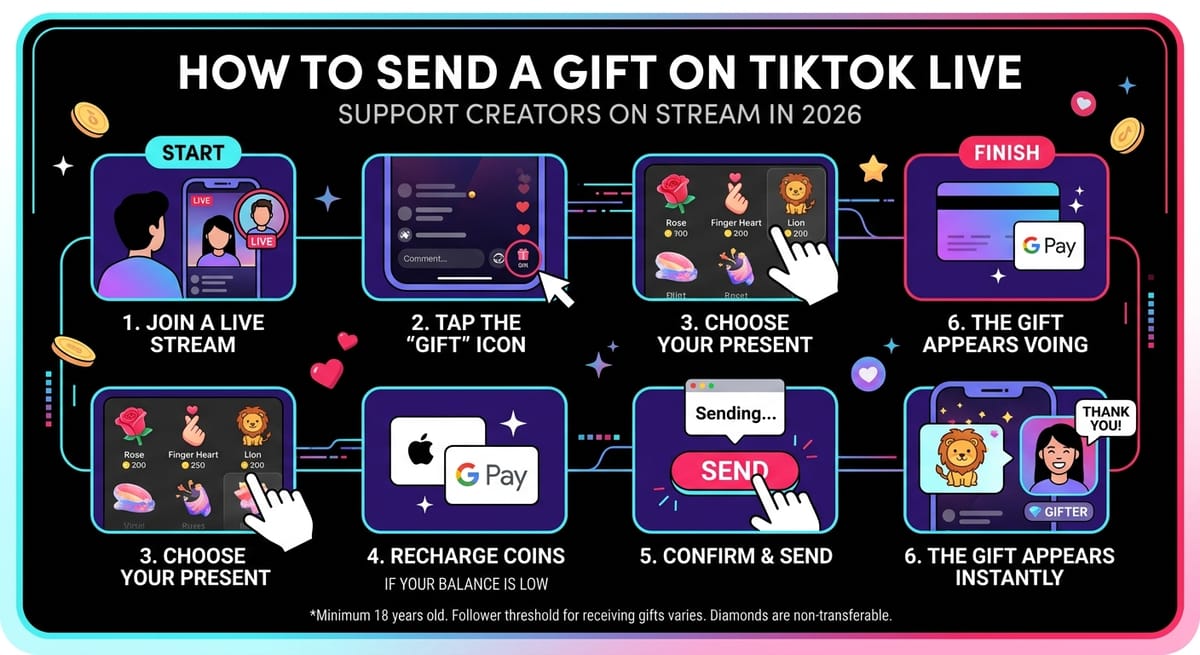
How to Send a Gift on TikTok LIVE: Quick Steps
Look for the Gift icon near the comment area. If it shows, gifting is active on that stream. From there:
- Tap the Gift icon at the bottom of the screen.
- Scroll through the options and pick one.
- Low on Coins? Hit Recharge and pay through the prompts.
- Press Send. Your present appears instantly for everyone watching.
Prices vary a lot, as the table below shows.
| Gift | Coin Price |
|---|---|
| Rose | 1 |
| Finger Heart | 5 |
| Lion | 29,999 |
| TikTok Universe | 34,999 |
What the Host Actually Earns
Every present a streamer receives becomes Diamonds. TikTok weighs how popular the content is, counting engagement and gift volume, and a summary after each broadcast lists the total. To gather Diamonds, a host must belong to Creator Next, be 18 or older (19 in South Korea, 20 in Japan), hold an account at least 30 days old with 1,000 or more followers, and keep a clean personal profile. Follower thresholds trip up many new hosts, so check how many followers you need on TikTok to go live before planning your first stream.
The platform keeps a big share. Estimates put its commission near 70%, so a viewer spending $1.00 leaves the host roughly $0.30. A mid-level streamer pulling 10,000 Coins in one session (about $100) would keep around $30. For a wider picture of creator payouts beyond gifting, see this breakdown of how much TikTok pays.
Cashing Out Diamonds
Payouts run through PayPal in U.S. dollars only. One withdrawal per day is allowed, from fixed amounts: $1 for first-timers, then $2, $5, or $20. Anything left over waits until the next threshold. In the EEA, UK, and Switzerland, minimums depend on the payment route, with PayPal starting at $1 and bank transfers needing $5 to $9. The daily ceiling is $1,000 or the local equivalent.
| Detail | Amount / Time |
|---|---|
| TikTok withdrawal fee | None |
| PayPal fee | 1.5% plus $0.10 |
| Bank transfer fee | $2.90 |
| TikTok review window | Up to 15 days |
| Possible PayPal hold | 21 more days |
| Longest total wait | 36 days |
Gifting on Regular Clips
Presents are not limited to streams. On an eligible upload, tap the Comments icon, then the Gift icon beside the “Add comment…” field. Choose from Classic or Premium options, top up Coins if needed, add an optional note, and send. Duets, Stitches, ads, sponsored posts, and clips breaking Community Guidelines cannot receive anything.
Rules Streamers Should Follow
TikTok asks hosts to thank every gifter, even with a quick shoutout. Trading presents for follows or promotions is against the rules, so lines like “gift me and I’ll follow back” are off limits. Support should feel natural, never forced.
How to Send a Gift on TikTok LIVE More Often: What Hosts Do
Top streamers keep sessions interactive with Q&As, polls, and mini-games. Some run an on-screen hall of fame for big supporters, perform a song for gifters, or share sneak peeks. Bringing a co-host on screen also lifts energy, and this walkthrough on how to go live with a friend on TikTok covers the multi-guest setup. A steady schedule builds regulars who give again and again, and if your uploads between streams are flopping, here is why your TikToks get no views and how to fix it.
A Real Payday Story
Reality star Spencer Pratt shows the ceiling here. After the January 2025 Los Angeles wildfires destroyed his home, he leaned into streaming. In one week he made $4,000 from normal activity, while fans sent an estimated $20,000 through LIVE Gifts. He gained over a million followers that same week and credited real people backing him rather than ads or algorithms. He also warned that nothing is guaranteed without constant engagement.
Final Word
Now you know how to send a gift on TikTok LIVE and what happens on the other side. Fans get a fun way to back someone they enjoy, while hosts who stream often and stay genuine can turn those little animations into steady money.