How to Add Products to TikTok Shop

Maxime Dupré
7/23/2026
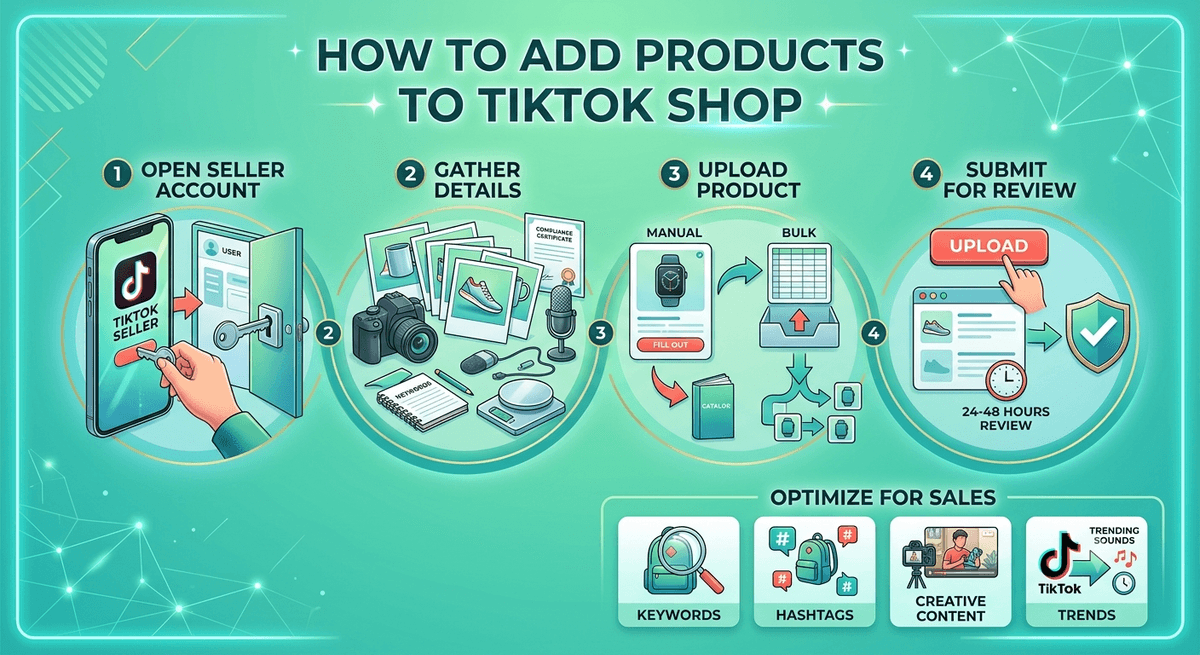
TikTok began as a video app and now works as a storefront too. Listing your catalog here puts products in front of buyers who already spend hours scrolling the feed. This guide covers how to add products to TikTok Shop, from opening Seller Center to sending your first listing for review.
What Is TikTok Seller Central?
TikTok Seller Central is the backend where merchants upload goods and manage sales. Link it to your account and your items can surface in the feed next to regular videos.
Good results start with a clean listing, so most of the real work happens before you hit publish. The channel keeps pulling in sellers because the money is there: TikTok Shop reached $33.2 billion in global GMV during 2024, up 202% from the year before.
| Year | Global GMV |
|---|---|
| 2023 | $11B |
| 2024 | $33.2B |
| 2025* | $66B |
TikTok Shop global gross merchandise value. 2025 figure is a full-year projection. Source: TTS Vibes.
How to Add Products to TikTok Shop Step by Step
Two upload paths exist: type each item in by hand, or send a batch file. Both start the same way.
Step 1: Open your seller account
Sign in at TikTok Seller Central, then open the Dashboard. This is where you handle stock, orders, ad campaigns, and account settings.
Step 2: Gather your product details
Have this ready before you build a listing.
| Field | What to prepare |
|---|---|
| Product title | Short but keyword-rich so it ranks in search |
| Description | Features, benefits, and what sets the item apart |
| Images | Sharp photos from several angles, 1080 x 1920 pixels |
| Specifications | Size, material, weight, and other key facts |
| Price and stock | Fair pricing and an accurate stock count |
| Category | The category that fits your item best |
| Compliance papers | Licences or certificates TikTok may ask for by product type |
Step 3: Upload the product
From the Dashboard, go to Products, then Add new product. TikTok gives you two options at this point.
How to Add Products to TikTok Shop Manually
The Quick Listing Tool copies an item that already exists, so you skip retyping. Search by product name, SKU, UPC, or brand, and TikTok pulls matching wording, photos, and specs from other sellers or its Product Library.
For a fresh item nobody has listed, fill every field yourself. Start with Basic Information: product name, images, brand, and category. Each category loads its own attributes.
Write the description next and drop in a short clip. Keep the wording plain, name the features buyers care about, and show the item in use.
Then enter sales info: price, discounts, and stock count. Set compliance fields after that. TikTok bans a range of goods, including weapons, counterfeits, and some health items, so read the Prohibited Products Policy first. These fields shift by category.
Add shipping details last: package size, weight, and your shipping method. Once every field is done, hit Submit. Review usually takes 24 to 48 hours.
How to Add Products to TikTok Shop in Bulk
On the manage products page, tap Bulk Action, then Bulk Listing. Pick a category, click Download template, fill the sheet with your items, and upload it.
Every product loads at once. This saves real time once your catalog grows past a handful of SKUs.
Optimize Your Listings for More Sales
A few tweaks help buyers find your goods.
| Tactic | How it helps |
|---|---|
| Right keywords | Work common search terms into titles and descriptions naturally |
| Hashtags | Tag product clips with fresh, fitting hashtags to lift reach |
| Strong content | Keep it clear, with the selling point up front |
| Match the trend | Line up promos with trending content for a wider push |
Once a listing goes live, film short clips of the product in action and add trending sounds. Teaming up with creators who fit your brand widens reach, and you can run TikTok ads to send traffic straight to your page.
Curious about payouts once sales roll in? See how much TikTok pays, and get clear on the payment options both sellers and buyers rely on before you launch.
FAQs
How long does TikTok take to review a listing?
Most listings clear within 24 to 48 hours. TikTok checks each one against its rules before it goes live, so complete every required field to avoid a rejection or a slower pass.
Which products are banned on TikTok Shop?
Counterfeits, illegal goods, weapons, and certain restricted health items are not allowed. Check the TikTok Shop Prohibited Products Policy for the full list, since rules vary by category and region.
Can I add many products at once?
Yes. Use Bulk Action, then Bulk Listing, on the manage products page. Download the category template, fill it with your items, and upload the sheet to load them all together.
What image size does TikTok Shop require?
Upload sharp photos sized 1080 x 1920 pixels, shot from several angles. Clear, consistent images help buyers judge the item and make your page look more professional.
Do I need brand documents to list?
Branded products often need authorization or a certificate proving you own or can resell the trademark. Compliance fields appear by category, so check what TikTok asks before you submit.